Feb 05

Bash And Exclusions in a List

Just a quick snippet on doing exclusions when you loop through a list.

DIRS=`ls -l --time-style="long-iso" $MYDIR | egrep '^d' | awk '{print $8}'`
EXCLUDELIST="mail Mail"

for EXCLUDE in $EXCLUDELIST
do
    DIRS=`echo $DIRS | sed "s/\b$EXCLUDE\b//g"`
done

for DIR in $DIRS
do
    echo  ${DIR} :
done

For some reason on Solaris sed had an issue with "\b" so I adjusted to sed "s/$EXCLUDE//g". Shown as follow:

#Linux:
$ echo "d1 d2 d3" | sed "s/\bd2\b//g"
d1  d3

# Solaris Fails:
# echo "d1 d2 d3" | sed "s/\bd2\b//g"
d1 d2 d3

# Solaris Works
# echo "d1 d2 d3" | sed "s/d2//g"
d1  d3

Comments Off on Bash And Exclusions in a List
comments

Feb 04

MS Excel Conditional Format Formula Copy and Paste

Normally I would just use a diff tool to compare text.  However sometimes a spreadsheet like MS Excel comes in handy to visually communicate to other people as well.

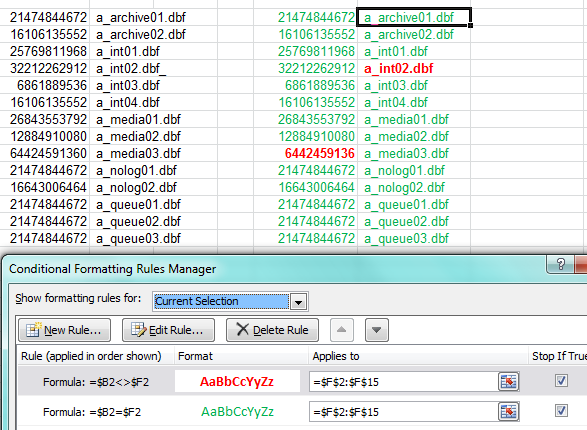
Conditional formatting is one way to accomplish this.  However I struggled getting the conditional formatting to copy to many rows.   For some reason the formula kept to a static cell in the newly formatted cells.  Finally got it to work as follow.  The screenshot indicates the end result I was after.  I needed to have conditional formatting to two separate columns.

Excel_Formatting_Patste_Issue

The answer was to setup your conditional formatting exactly the way you need it in your first cell (F2 in my case).

Remember to remove the row $ in the formula to make sure its not static.  As in $B2:$F2 and NOT $B$2:$F$2 by default.

Then DOUBLE CLICK the paintbrush and apply format to new cells.

Before double clicking the paintbrush the formula would never increment the cells in the formula.

Comments Off on MS Excel Conditional Format Formula Copy and Paste
comments

Dec 30

Sanitizing Email Recipient List

I wrote a couple articles on respectively using sendmail and postfix to block outbound email and only allow selective domains and selective email addresses.  I ran into problems with both sendmail and postfix doing exactly what I want.  Sendmail was fairly easy to satisfy the requirements for forwarding only to certain domains. Postfix got very close on doing domains plus a selective few email addresses.  I could not get the multi instance postfix method working 100% with my header checks though.

Below is another method to sanitize outbound email addresses using python smtplib and sendmail.

Sendmail answer on non standard port:

root@myhost:/etc/mail/cf/cf# more usla-utility.mc
divert(-1)
...
divert(0)dnl
VERSIONID(`sendmail.mc (Sun)')
OSTYPE(`solaris11')dnl
DOMAIN(`solaris-generic')dnl
DAEMON_OPTIONS(`Port=10026,Addr=127.0.0.1, Name=MTA')dnl
MASQUERADE_AS(`arbonne.com')
FEATURE(masquerade_envelope)
FEATURE(`mailertable')
MAILER(`local')dnl<br />

root@myhost:/etc/mail/cf/cf# /usr/ccs/bin/m4 ../m4/cf.m4 myhost.mc > /etc/mail/sendmail.cf

I needed some specific transports so I have a mailertable:

root@myhost:/etc/mail# makemap hash mailertable < mailertable

Run a small python smtplib SMTP forwarder on port 25:

More information here: http://docs.python.org/2/library/smtplib.html#smtp-example

Run python in the background:

root@myhost:# nohup python sanitizer.py &

My code snippet to sanitize. Probably need to look at CC and BCC also.

...
allowedDomains = ['domain1.com','domain2.com','domain3.com','domain4.com']
      allowedRecipients = ['user@domain5.com']
      for rcpt in rcpttos[:]:
        user,domain = rcpt.split("@")
        if not (rcpt.lower() in allowedRecipients or domain.lower() in allowedDomains):
          #log.debug("%s not allowed per our policy" % rcpt)
          i = rcpttos[:].index(rcpt)
          del rcpttos[i]
      log.debug("sanitized list %s" % rcpttos)
...

Monitor the custom log:

root@myhost:~# tail -f sanitizer.log 
... DEBUG:__main__:Received message from: ('10.1.11.86', 32841). From: root@myclient | To: ['user1@domain1.com', 'user2@domain2.com', 'user3@domain3.com', 'user4@domain1.com'] DEBUG:__main__:sanitized list ['user3@domain3.com']

Inject a test from client:

root@myclient:/tmp# cat /tmp/test_all.eml
To: user1@domain1.com,user2@domain2.com,user3@domain3.com,user4@domain1.com 
Subject: MAILHOST TEST DL
From: luser@mydomain.com
body...

root@myclient:/tmp# sendmail -d7.99 -d38.99 -vt < /tmp/test_all.eml

Monitor the real maillog of sendmail to see what happened:

Comments Off on Sanitizing Email Recipient List
comments

Dec 29

Postfix Filter Outbound Email

In a previous article I wrote about using Sendmail to block outbound email and at the same time allow email to specific domains or specific email addresses.

As I explained Sendmail could handle blocking and selective relaying to domains effectively but could not easily handle adding specific email addresses to the mix.  Below is a quick howto on setting up Postfix on Solaris 11 and configuring the blocking as required.

# svcadm disable svc:/network/smtp:sendmail

# pkg install developer/gcc-45
# pkg install library/gnutls

** Note that the postfix-install script kicks off during gmake install. You will note I used /usr/local for install_root since I do not want to taint anything on the regular paths. However that does not work very well. I ended up having to move quite a few folders and files from /usr/local/usr/local to /usr/local. I will have to try this again and see if using / for install_root is acceptable for keeping things separate and not taint system paths.

# wget http://postfix.bbnx.net/postfix-release/official/postfix-2.10.2.tar.gz
# gzip -d postfix-2.10.2.tar.gz
# tar xf postfix-2.10.2.tar
# pwd
/usr/src/postfix-2.10.2

# gmake clean
# gmake makefiles MAKE=gmake CCARGS='-DNO_NIS -DUSE_TLS -lssl -lcrypto'
# gmake
# gmake install
...
/bin/sh postfix-install
...
install_root: [/] /usr/local/
tempdir: [/usr/src/postfix-2.10.2]
config_directory: [/etc/postfix]
command_directory: [/usr/sbin] /usr/local/sbin
daemon_directory: [/usr/libexec/postfix] /usr/local/libexec/postfix
data_directory: [/var/lib/postfix]
html_directory: [no]
mail_owner: [postfix]
mailq_path: [/usr/bin/mailq] /usr/local/bin/mailq
manpage_directory: [/usr/local/man]
newaliases_path: [/usr/bin/newaliases] /usr/local/bin/newaliases
queue_directory: [/var/spool/postfix]
readme_directory: [no]
sendmail_path: [/usr/lib/sendmail]
setgid_group: [postdrop]
...

Setup user, group and configure Postfix:

# groupadd postdrop
# useradd -d /export/home/postfix -s /usr/bin/bash -m postfix
80 blocks

# mkdir /etc/postfix
# pwd
/etc/postfix

# grep -v ^# main.cf | grep ".$"
queue_directory = /var/spool/postfix
command_directory = /usr/local/sbin
daemon_directory = /usr/local/libexec/postfix
data_directory = /var/lib/postfix
mail_owner = postfix
unknown_local_recipient_reject_code = 550
mynetworks = 10.2.0.0/16, 127.0.0.0/8
debug_peer_level = 2
debugger_command =
PATH=/bin:/usr/bin:/usr/local/bin:/usr/X11R6/bin
 ddd $daemon_directory/$process_name $process_id & sleep 5
sendmail_path = /usr/lib/sendmail
newaliases_path = /usr/local/bin/newaliases
mailq_path = /usr/local/bin/mailq
setgid_group = postdrop
html_directory = no
manpage_directory = /usr/local/man
sample_directory = /etc/postfix
readme_directory = no
inet_protocols = ipv4
header_checks = pcre:/etc/postfix/header_checks

# tail -4 header_checks
/^To: .*@domain1\.com/ FILTER smtp:mail.domain1.com
/^To: .*@domain2\.com/ ACCEPT
/^To: user@domain3\.com/ ACCEPT
/^To: .*/ REJECT

***  ACCEPT is not really a defined ACTION but for me this works.  I will have to look into this closer.  Maybe action should be INFO.

*** Note that domain1 needed to relay to a specific internal host whereas domain2 is an example of direct forwarding to the Internet.

Fix the /usr/local/usr/local installation. Should do a re-install and fix this.

mv /usr/local/etc/postfix/* /etc/postfix/

mkdir /usr/local/sbin
mkdir /usr/local/libexec/
mkdir /usr/local/libexec/postfix
mkdir /var/spool/postfix

mv /usr/local/usr/local/libexec/ /usr/local/
mv /usr/local/usr/local/libexec/postfix/postfix-script /usr/local/libexec/postfix/
mv /usr/local/usr/local/sbin/post* /usr/local/sbin/
mv /usr/local/usr/local/libexec/postfix/* /usr/local/libexec/postfix/

chgrp postdrop /usr/local/sbin/postqueue
chgrp postdrop /usr/local/sbin/postdrop
chmod +x /usr/local/sbin/postqueue
chmod +x /usr/local/sbin/postdrop

chmod +s /usr/local/sbin/postqueue
chmod +s /usr/local/sbin/postdrop

Start and test:

# /usr/local/sbin/postfix start

# tail -f /var/log/syslog

TODO: Redo and fix installation and add to Solaris SMF.

Update 12.30.13:

More testing showed that this solution does not work well with mailing lists ie multiple recipients in the To: field.   After playing with a lot of different options I finally liked the idea of running multi-postfix.  In short that entails a 1st instance accepting mail on port 25 and then split the message into multiple messages and feed it to the 2nd instance on 127.0.0.1:10026 or whatever addresses and ports you prefer.  The trick is to use default_destination_recipient_limit = 1 option on the frontend instance.  This seemed like an elegant solution, but for me my header checks were still not working like I want.  After a lot of fiddling I decided to use a different approach.  At some point I will document the two postfix instance solution since it might fit a lot of use cases.

The solution that I finally used was accepting mail on port 25 with python smtplib and then sanitizing the list before injecting back into sendmail on say127.0.0.1:10026.  The article here:  <>


Comments Off on Postfix Filter Outbound Email
comments

Dec 29

Sendmail Filter Outbound Email

In some projects I need to block outbound email but still allow email to a select few domains (or even select few addresses).

As Sendmail comes standard on a lot of Unix operating systems I show here how to set this up.  Sendmail handles some of these requirements pretty easy.  Additional options like filtering through procmail as well as using Sendmail milters are also good options but not very easy to configure.   I did not check but I suspect Linux comes with packages that would make installing python or perl Milter modules easy.

Since Milter packages are not readily available on Solaris and I am focusing on Solaris for this particular project I will use Postfix to meet all the requirements instead of Sendmail + procmail / Milters.  I will follow up with a Postfix specific article later since it does better at filtering and relaying than Sendmail.

My use case:

  1. First block ALL outbound email
  2. Allow ALL outbound email to two specific domains
  3. Allow email to very specific email addresses not included in above mentioned two domains

Sendmail handled #1 and #2 pretty easily but it gets overly complicated to allow #1, #2 and #3 at the same time.  Below is the configuration for #1 and #2 on Solaris 11.

# pwd
/etc/mail/cf/cf

# cp sendmail.mc myhost.mc

# cat myhost.mc
divert(-1)
... snip ...
divert(0)dnl
VERSIONID(`sendmail.mc (Sun)')
OSTYPE(`solaris11')dnl
DOMAIN(`solaris-generic')dnl
dnl DAEMON_OPTIONS(`Port=smtp,Addr=127.0.0.1, Name=MTA')dnl
DAEMON_OPTIONS(`Port=smtp,Addr=10.1.10.52, Name=MTA')dnl
MASQUERADE_AS(`mydomain.com')
FEATURE(masquerade_envelope)
FEATURE(`access_db')
FEATURE(`mailertable')
MAILER(`local')dnl
MAILER(`smtp')dnl

# /usr/ccs/bin/m4 ../m4/cf.m4 myhost.mc > /etc/mail/sendmail.cf

** You probably don't need the access feature and local mailer above for this specific configuration. But access might provide more granularity around permissions that might help you.

Setup mailertable. Remember use tabs between left and right columns.

# pwd
/etc/mail

# cat mailertable
domain1.com             relay:[mail.domain1.com]
domain2.com             esmtp:%0
.                       local:nobody

# makemap hash mailertable < mailertable

** Note above domain1 needed to be passed off to a specific relay on the internal network and domain2 needed to be passed on direct to the Internet.

On Solaris set local_only to false and start senmdail service.

# svccfg -s svc:/network/smtp:sendmail setprop config/local_only = false
# svcadm disable svc:/network/smtp:sendmail
# svcadm enable svc:/network/smtp:sendmail

From client setup a smarthost poitning to new server we configured and then test as follow:

# cat /tmp/test.eml
To: user@domain1.com
Subject: MAILHOST TEST -&gt; via domain1
From: luser@domain.com

body....

# sendmail -d7.99 -d38.99 -vt &lt; /tmp/test.eml

Monitor var/log/syslog:

Dec 27 14:44:34 myhost sendmail[6774]: [ID 801593 mail.info] rBRJiYFA006774: from=&lt;root@myclient&gt;, size=554,, nrcpts=1, msgid=&lt;201312271946.rBRJkgq8001045@myclient&gt;, proto=ESMTP, daemon=MTA, relay=myclient [10.1.11.62]
Dec 27 14:44:35 myhost sendmail[6776]: [ID 702911 mail.info] STARTTLS=client, relay=mail.arbonne.com., version=TLSv1/SSLv3, verify=FAIL, cipher=AES128-SHA, bits=128/128
Dec 27 14:44:36 myhost sendmail[6776]: [ID 801593 mail.info] rBRJiYFA006774: to=&lt;user@domain1.com&gt;, delay=00:00:02, xdelay=00:00:02, mailer=relay, pri=120554, relay=mail.domain1.com. [10.10.1.130], dsn=2.0.0, stat=Sent (&lt;201312271946.rBRJkgq8001045@usla-psag-ag01.prd.asg.ad&gt; [InternalId=15753532] Queued mail for delivery)
Comments Off on Sendmail Filter Outbound Email
comments

Nov 06

SUN Oracle ZFS Storage Simulator

Previously I wrote an article on getting the ZFS simulator to run on OVM.

Until recently I did not realize that I could upgrade the ZFS simulator on Virtualbox.  I kind of assumed the appliance is checking in the background and showing possible upgrades in the Available Updates page.  None of my simulators or real ZFS appliances was showing new Available updates either.  So here is what I did to update the simulator.  I assume it will work with the OVM ported version also.

If you go to this page https://wikis.oracle.com/display/fishworks/Software+Updates you can see what updates are available for your hardware or simulator.   Then updating is easy.  Just download the zip file you need.  Read the Release Notes.  Then uncompress the file where you are staging.  In the Maintenance > System screen click the plus sign next to Available Updates.  Find the .gz file in the folder structure and upload the image.  Follow the questions.

My simulator running under Virtualbox now shows the below version.  Note that the simulator was too far behind to skip to the latest version so I had to do an extra 2011.04.24 version also.

Comments Off on SUN Oracle ZFS Storage Simulator
comments

Oct 30

Network Manager VPN Connections

I have documented previously that the Linux network manager can be used to connect to several different VPN gateways.  There are several network manager plugins available for the different VPN solutions.  The pptp plugin is used frequently but for newer Cisco gateways you should use the network-manager-openconnect-gnome plugin. You should use the network-manager-vpnc plugin to connect to older Cisco gateways.

The vpnc plugin also happens to work for Palo Alto GlobalProtect concentrators.  For the vpnc plugin to work with Palo Alto GlobalProtect gateways you need to:

- Enable X-Auth on your VPN gateway. You will also need the group name and password from the VPN administrator.

- Create a "Cisco compatible" VPN when creating your network manager connection.


Comments Off on Network Manager VPN Connections
comments

Oct 16

HAProxy on Solaris 11

Quick example of a simple HAProxy setup on Solaris 11.

Create a suitable home and download the binary:

# pwd
/usr/local/haproxy

# wget http://haproxy.1wt.eu/download/1.4/bin/haproxy-1.4.24-pcre-solaris-sparc.notstripped.gz

# gzip -d haproxy-1.4.24-pcre-solaris-sparc.notstripped.gz
# chmod +x haproxy-1.4.24-pcre-solaris-sparc.notstripped
# file haproxy-1.4.24-pcre-solaris-sparc.notstripped
haproxy-1.4.24-pcre-solaris-sparc.notstripped: ELF 32-bit MSB executable SPARC32PLUS Version 1, V8+ Required, dynamically linked, not stripped

# ./haproxy-1.4.24-pcre-solaris-sparc.notstripped
HA-Proxy version 1.4.24 2011/03/09
Copyright 2000-2010 Willy Tarreau &lt;w@1wt.eu&gt;
Usage : ./haproxy-1.4.24-pcre-solaris-sparc.notstripped [-f ]* [ -vdVD ] [ -n ] [ -N ]
[ -p ] [ -m ]
-v displays version ; -vv shows known build options.
-d enters debug mode ; -db only disables background mode.
-V enters verbose mode (disables quiet mode)
-D goes daemon
-q quiet mode : don't display messages
-c check mode : only check config files and exit
-n sets the maximum total # of connections (2000)
-m limits the usable amount of memory (in MB)
-N sets the default, per-proxy maximum # of connections (2000)
-p writes pids of all children to this file
-dp disables poll() usage even when available
-sf/-st [pid ]* finishes/terminates old pids. Must be last arguments.

Setup a small config file:

# cat haproxy.cfg
global
daemon
maxconn 256

defaults
mode http
timeout connect 5000ms
timeout client 50000ms
timeout server 50000ms

frontend http-in
bind *:80
default_backend app1

backend app1
server s1 10.0.1.10:80 maxconn 32
server s2 10.0.1.11:80 maxconn 32
server s3 10.0.1.12:80 maxconn 32

listen admin
bind *:8080
stats enable

Stop anything running on the ports you want to listen on:

# svcs -a | grep apache
disabled Oct_10 svc:/network/http:apache22

Run the HAProxy binary and config:

# ./haproxy-1.4.24-pcre-solaris-sparc.notstripped -f ./haproxy.cfg
# ps -ef | grep haproxy
root 20765 1 0 08:31:46 ? 0:00 ./haproxy-1.4.24-pcre-solaris-sparc.notstripped -f ./haproxy.cfg

Test the stats page and the load balanced page you configured:

http://lbserver:8080/haproxy?stats

http://lbserver/myapp/

Comments Off on HAProxy on Solaris 11
comments

Oct 16

PHP SSH2 Bindings

PHP can use the bindings to the  libssh2 library which provide access to resources (shell, remote exec, tunneling, file transfer) on a remote machine using a secure cryptographic transport.   I documented some code snippets for future reference.

You can use ssh keys but for simplicity here making the call with a password:

$conn_id = ssh2_connect('server', 22);
ssh2_auth_password($conn_id, 'user', 'pwd');

echo("SOLARIS SERVER SNAPSHOTS - CREATION);
$stream=ssh2_exec($conn_id,"/usr/sbin/zfs list -t snapshot -o name,creation | grep $share | grep -v tank");
$outS="";
stream_set_blocking($stream, true);
while($o=fgets($stream)){
$outS = $outS . $o;
}
fclose($stream);
print_snaps_sorted($outS);

Slightly more complicated to make up the built-in javascript "command" you are passing when using a ZFS appliance. 

$chk_snaps_cmd="
run('select DBF');
run('snapshots');
snapshots = list();
for (i = 0; i < snapshots.length; i++) {
run('select ' + snapshots[i]);
creation = run('get creation');
printf('%s %s', snapshots[i],creation);
run('cd ..');
}";

$share = $_GET['share'];
$conn_id = ssh2_connect('server', 22);
ssh2_auth_password($conn_id, 'user', 'pwd');
echo('ZFS STORAGE APPLIANCE SNAPSHOTS - CREATION');
$stream=ssh2_exec($conn_id,"script run('shares select $share');" . $chk_snaps_cmd);
stream_set_blocking($stream, true);
while($o=fgets($stream)){
  $outS = $outS . $o;
}
fclose($stream);
print_snaps_sorted($outS);

Note:  I had an issues using ssh calls not returning results when using a non-privileged user whereas a root user worked.   Thanks Matt M for pointing out the obvious.  I needed to use the full path to the binary in this case /usr/sbin/zfs so most likely some path issue in the user shell.

1
comments

Oct 09

Fedora 20 Alpha Virtualbox Guest Additions

Just a quick note on getting the guest additions to work on Fedora 20 Alpha. In my setup I was getting the below error when installing VBOXADDITIONS_4.2.18_88780.

...
Building the VirtualBox Guest Additions kernel modules
The headers for the current running kernel were not found. If the following
module compilation fails then this could be the reason.
The missing package can be probably installed with
yum install kernel-devel-3.11.3-301.fc20.i686+PAE

Building the main Guest Additions module [FAILED]
...

As you can see the suggestion above was wrong.  After installing the correct package I could install ok.

# yum install kernel-PAE-devel.i686

1
comments