Category: Solaris

May 28

Solaris 10 which package do I need

In Solaris 11 package management got a lot better and is almost as good as APT in the Linux world.  In Solaris 10 not so much.  A lot of times I find myself comparing systems and trying to track down which package I need for a specific binary.  The pkgchk command can help here:

Example:

# pkgchk -l -p /usr/bin/pdftops
Pathname: /usr/bin/pdftops
Type: regular file
Expected mode: 0755
Expected owner: root
Expected group: other
Expected file size (bytes): 22316
Expected sum(1) of contents: 15618
Expected last modification: May 17 22:40:06 2012
Referenced by the following packages:
        SUNWevince
Current status: installed

And of course install from CDROM as follow.

# pkgadd -d /mnt/Solaris_10/Product/ SUNWevince

Be warned here your nightmare starts when the package management starts pointing out all the dependencies.

Comments Off on Solaris 10 which package do I need
comments

May 22

Solaris 11.1 Using Wget for Oracle Software Downloads

Following is my notes on several Solaris 11 procedures.  I just bunched it together but you may just need one of them and most unlikely all of them at the same time.

** Of course you need to comply with Oracle licensing when downloading software and need an OTN account.

Index

  1. Using wget to download a support patch from Oracle support site.
  2. Installing a package in Solaris 11 but no Solaris 11 repo access and incremental repo shows dependency failures.  Meaning we need a full repo also to meet dependencies.
  3. Downloading with wget from Oracle Edelivery using cookies.

1. Downloading from Oracle support using wget.

(In this example I grabbed Solaris 11.1 SRU 19.6)

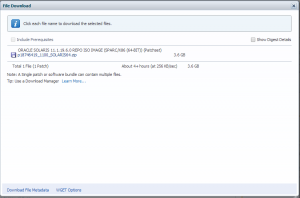
Patch 18746419: ORACLE SOLARIS 11.1.19.6.0 REPO ISO IMAGE (SPARC/X86 (64-BIT))

oracle_wget_option

Download the “WGET Options” file at the bottom.  Set your password in the script and run the script.

# grep ^SSO_P wgetsru19.6.sh
SSO_PASSWORD=

Inside the wget script the actual wget will look something like this:

$WGET --user-agent="Mozilla/5.0" --load-cookies=$COOKIE_FILE --save-cookies=$COOKIE_FILE --keep-session-cookies "https://updates.oracle.com/Orion/Services/download/p18746419_1100_SOLARIS64.zip?aru=17658104&patch_file=p18746419_1100_SOLARIS64.zip" -O $OUTPUT_DIR/p18746419_1100_SOLARIS64.zip


  1. Installing a package in Solaris 11

    Keeping in mind I have no Solaris 11 online repo access and using only the incremental repo shows dependency failures.  Meaning we need a full repo (either online or iso) to meet dependencies.

I was trying to install VNC server and in my case I only had the SRU 19.6 incremental CD repo to work with.  So I had to go get the full repo also to satisfy dependencies.

# lofiadm -a /software/solaris/sol-11_1_18_5_0-incr-repo.iso
/dev/lofi/1
# mount -o ro -F hsfs /dev/lofi/1 /mnt
# pkg set-publisher -g file:///mnt/repo solaris
# pkg publisher
PUBLISHER      TYPE      STATUS P    LOCATION
solaris        origin    online F    file:///mnt/repo/
# pkg install pkg:/x11/server/xvnc@1.1.0-0.175.1.17.0.3.1348
Creating Plan (Solver setup): /
pkg install: No matching version of x11/server/xvnc can be installed:
Reject: pkg://solaris/x11/server/xvnc@1.1.0,5.11-0.175.1.17.0.3.1348:20140221T230347Z
Reason: A version for 'require' dependency on pkg:/x11/keyboard/xkbcomp cannot be found

Normally you can at this point just add the Oracle online server repo from pkg.oracle.com.  But in my case this specific host is firewalled off and no http outbound access allowed.  If you did have http outbound you could end up with below and it should work:

# pkg publisher
PUBLISHER                   TYPE     STATUS P LOCATION
solaris                     origin   online F file:///mnt/repo/
solaris                     origin   online F http://pkg.oracle.com/solaris/release/


  1. A) Downloading with wget from Oracle Edelivery using cookies.

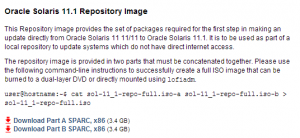
 I am proceeding to download the following full repo.  You can also download this in a browser but I did not want to download to my desktop and turn around and upload through a VPN connection so I wanted wget to download straight to the server.

** More on cookies and edelivery here: http://www.pythian.com/blog/how-to-download-oracle-software-using-wget-or-curl/

Files are here: http://www.oracle.com/technetwork/server-storage/solaris11/downloads/index.html

solaris11_full_repo

# wget --load-cookies=./cookies.txt --no-check-certificate "http://download.oracle.com/otn/solaris/11_1/sol-11_1-repo-full.iso-a"

# wget --load-cookies=./cookies.txt --no-check-certificate <a href="http://download.oracle.com/otn/solaris/11_1/sol-11_1-repo-full.iso-b">http://download.oracle.com/otn/solaris/11_1/sol-11_1-repo-full.iso-b</a>

# cat sol-11_1-repo-full.iso-a sol-11_1-repo-full.iso-b &gt; sol-11_1-repo-full.iso


3. B) Now let’s install the software

# lofiadm -a /software/solaris/sol-11_1-repo-full.iso
/dev/lofi/2
# mount -o ro -F hsfs /dev/lofi/2 /sol11
# ls /sol11/
COPYRIGHT  NOTICES    README     repo
# pkg set-publisher -g file:///sol11/repo solaris
# pkg publisher
PUBLISHER                   TYPE     STATUS P LOCATION
solaris                     origin   online F file:///mnt/repo/
solaris                     origin   online F file:///sol11/repo/

# pkg install pkg:/x11/server/xvnc@1.1.0-0.175.1.17.0.3.1348
Packages to install: 35
Create boot environment: No
Create backup boot environment: No
Services to change:  5

DOWNLOAD                                PKGS         FILES    XFER (MB)   SPEED
Completed                              35/35     2305/2305    26.2/26.2    0B/s

PHASE                                          ITEMS
Installing new actions                     3341/3341
Updating package state database                 Done
Updating image state                            Done
Creating fast lookup database                   Done

# pkg unset-publisher solaris
# pkg publisher
PUBLISHER                   TYPE     STATUS P LOCATION
# umount /sol11/
# rmdir /sol11/
# umount /mnt
# lofiadm -d /dev/lofi/2
# lofiadm -d /dev/lofi/1


Comments Off on Solaris 11.1 Using Wget for Oracle Software Downloads
comments

Apr 11

VNC Server on a minimal Solaris 10 Server

I generally prefer installing server with a very minimal footprint and just add what is necessary. Think small templates etc..

Solaris 10 can be a bit difficult to add software. More modern package management systems like IPS or APT / YUM in the Linux world makes this much easier.

Here is what I had to do to get vncserver running after a very minimal Solaris 10 install. Out of scope is getting a CD with software mounted. MY CD was mounted under /mnt so the packages were located in /mnt/Solaris_10/Product.

VNC Server and dependencies

# pkgadd -d . SUNWxvnc SUNWxwfnt SUNWxorg-xkb SUNWxwplt SUNWxorg-clientlibs SUNWxorg-server

xauth required for vncserver binary

# pkgadd -d . SUNWxwplt SUNWxwice SUNWxwrtl SUNWxwplr

Will need twm for at least a minimal window manager for a xterm. Gives twm in /usr/openwin/bin

# pkgadd -d . SUNWxwopt

Will need the path for xauth and twm to fire.

# grep PATH .profile
export PATH=/usr/bin:/usr/sbin
PATH=$PATH:/usr/X11/bin:/usr/openwin/bin
export PATH

For reference here is where vnc pulls xterm.

# cat .vnc/xstartup
#!/bin/sh

[ -r $HOME/.Xresources ] && xrdb $HOME/.Xresources
xsetroot -solid grey
vncconfig -iconic &
#xterm -geometry 80x24+10+10 -ls -title "$VNCDESKTOP Desktop" &
xterm -geometry 120x34+10+10 -ls -title "$VNCDESKTOP Desktop" &
twm &

Comments Off on VNC Server on a minimal Solaris 10 Server
comments

Mar 27

Howto grab additional lines when grep is ancient

In modern grep utilities can use -A (after) and -B (before) to return additional lines from your search. Solaris 11 still does not have a grep that can do this. Several options exist but this is one that worked for me.

Example output without grep. I wanted Vendor and one extra line after for Size.

# iostat -E
[...]
ssd24     Soft Errors: 0 Hard Errors: 0 Transport Errors: 0
Vendor: 3PARdata Product: VV               Revision: 3123 Serial No: 1203842
Size: 268.44GB <268435456000 bytes>
Media Error: 0 Device Not Ready: 0 No Device: 0 Recoverable: 0
Illegal Request: 0 Predictive Failure Analysis: 0
ssd25     Soft Errors: 0 Hard Errors: 0 Transport Errors: 0
Vendor: 3PARdata Product: VV               Revision: 3123 Serial No: 1203842
Size: 273.80GB <273804165120 bytes>
Media Error: 0 Device Not Ready: 0 No Device: 0 Recoverable: 0
[..]

One possible way with awk. "ssd" was my start and "2" was my number of lines after.

# iostat -E | awk '/'"ssd"'/{l=1;count=NR;next} l>0 && NR-count < '"2"+1' {print}'
Vendor: 3PARdata Product: VV Revision: 3123 Serial No: .....
Size: 268.44GB
Vendor: 3PARdata Product: VV Revision: 3123 Serial No: .....
Size: 273.80GB
Vendor: 3PARdata Product: VV Revision: 3123 Serial No: .....
Size: 536.87GB
Vendor: SUN Product: ZFS Storage 7330 Revision: 1.0 Serial No:
Size: 37.58GB

Comments Off on Howto grab additional lines when grep is ancient
comments

Dec 29

Postfix Filter Outbound Email

In a previous article I wrote about using Sendmail to block outbound email and at the same time allow email to specific domains or specific email addresses.

As I explained Sendmail could handle blocking and selective relaying to domains effectively but could not easily handle adding specific email addresses to the mix.  Below is a quick howto on setting up Postfix on Solaris 11 and configuring the blocking as required.

# svcadm disable svc:/network/smtp:sendmail

# pkg install developer/gcc-45
# pkg install library/gnutls

** Note that the postfix-install script kicks off during gmake install. You will note I used /usr/local for install_root since I do not want to taint anything on the regular paths. However that does not work very well. I ended up having to move quite a few folders and files from /usr/local/usr/local to /usr/local. I will have to try this again and see if using / for install_root is acceptable for keeping things separate and not taint system paths.

# wget http://postfix.bbnx.net/postfix-release/official/postfix-2.10.2.tar.gz
# gzip -d postfix-2.10.2.tar.gz
# tar xf postfix-2.10.2.tar
# pwd
/usr/src/postfix-2.10.2

# gmake clean
# gmake makefiles MAKE=gmake CCARGS='-DNO_NIS -DUSE_TLS -lssl -lcrypto'
# gmake
# gmake install
...
/bin/sh postfix-install
...
install_root: [/] /usr/local/
tempdir: [/usr/src/postfix-2.10.2]
config_directory: [/etc/postfix]
command_directory: [/usr/sbin] /usr/local/sbin
daemon_directory: [/usr/libexec/postfix] /usr/local/libexec/postfix
data_directory: [/var/lib/postfix]
html_directory: [no]
mail_owner: [postfix]
mailq_path: [/usr/bin/mailq] /usr/local/bin/mailq
manpage_directory: [/usr/local/man]
newaliases_path: [/usr/bin/newaliases] /usr/local/bin/newaliases
queue_directory: [/var/spool/postfix]
readme_directory: [no]
sendmail_path: [/usr/lib/sendmail]
setgid_group: [postdrop]
...

Setup user, group and configure Postfix:

# groupadd postdrop
# useradd -d /export/home/postfix -s /usr/bin/bash -m postfix
80 blocks

# mkdir /etc/postfix
# pwd
/etc/postfix

# grep -v ^# main.cf | grep ".$"
queue_directory = /var/spool/postfix
command_directory = /usr/local/sbin
daemon_directory = /usr/local/libexec/postfix
data_directory = /var/lib/postfix
mail_owner = postfix
unknown_local_recipient_reject_code = 550
mynetworks = 10.2.0.0/16, 127.0.0.0/8
debug_peer_level = 2
debugger_command =
PATH=/bin:/usr/bin:/usr/local/bin:/usr/X11R6/bin
 ddd $daemon_directory/$process_name $process_id & sleep 5
sendmail_path = /usr/lib/sendmail
newaliases_path = /usr/local/bin/newaliases
mailq_path = /usr/local/bin/mailq
setgid_group = postdrop
html_directory = no
manpage_directory = /usr/local/man
sample_directory = /etc/postfix
readme_directory = no
inet_protocols = ipv4
header_checks = pcre:/etc/postfix/header_checks

# tail -4 header_checks
/^To: .*@domain1\.com/ FILTER smtp:mail.domain1.com
/^To: .*@domain2\.com/ ACCEPT
/^To: user@domain3\.com/ ACCEPT
/^To: .*/ REJECT

***  ACCEPT is not really a defined ACTION but for me this works.  I will have to look into this closer.  Maybe action should be INFO.

*** Note that domain1 needed to relay to a specific internal host whereas domain2 is an example of direct forwarding to the Internet.

Fix the /usr/local/usr/local installation. Should do a re-install and fix this.

mv /usr/local/etc/postfix/* /etc/postfix/

mkdir /usr/local/sbin
mkdir /usr/local/libexec/
mkdir /usr/local/libexec/postfix
mkdir /var/spool/postfix

mv /usr/local/usr/local/libexec/ /usr/local/
mv /usr/local/usr/local/libexec/postfix/postfix-script /usr/local/libexec/postfix/
mv /usr/local/usr/local/sbin/post* /usr/local/sbin/
mv /usr/local/usr/local/libexec/postfix/* /usr/local/libexec/postfix/

chgrp postdrop /usr/local/sbin/postqueue
chgrp postdrop /usr/local/sbin/postdrop
chmod +x /usr/local/sbin/postqueue
chmod +x /usr/local/sbin/postdrop

chmod +s /usr/local/sbin/postqueue
chmod +s /usr/local/sbin/postdrop

Start and test:

# /usr/local/sbin/postfix start

# tail -f /var/log/syslog

TODO: Redo and fix installation and add to Solaris SMF.

Update 12.30.13:

More testing showed that this solution does not work well with mailing lists ie multiple recipients in the To: field.   After playing with a lot of different options I finally liked the idea of running multi-postfix.  In short that entails a 1st instance accepting mail on port 25 and then split the message into multiple messages and feed it to the 2nd instance on 127.0.0.1:10026 or whatever addresses and ports you prefer.  The trick is to use default_destination_recipient_limit = 1 option on the frontend instance.  This seemed like an elegant solution, but for me my header checks were still not working like I want.  After a lot of fiddling I decided to use a different approach.  At some point I will document the two postfix instance solution since it might fit a lot of use cases.

The solution that I finally used was accepting mail on port 25 with python smtplib and then sanitizing the list before injecting back into sendmail on say127.0.0.1:10026.  The article here:  <>


Comments Off on Postfix Filter Outbound Email
comments

Dec 29

Sendmail Filter Outbound Email

In some projects I need to block outbound email but still allow email to a select few domains (or even select few addresses).

As Sendmail comes standard on a lot of Unix operating systems I show here how to set this up.  Sendmail handles some of these requirements pretty easy.  Additional options like filtering through procmail as well as using Sendmail milters are also good options but not very easy to configure.   I did not check but I suspect Linux comes with packages that would make installing python or perl Milter modules easy.

Since Milter packages are not readily available on Solaris and I am focusing on Solaris for this particular project I will use Postfix to meet all the requirements instead of Sendmail + procmail / Milters.  I will follow up with a Postfix specific article later since it does better at filtering and relaying than Sendmail.

My use case:

  1. First block ALL outbound email
  2. Allow ALL outbound email to two specific domains
  3. Allow email to very specific email addresses not included in above mentioned two domains

Sendmail handled #1 and #2 pretty easily but it gets overly complicated to allow #1, #2 and #3 at the same time.  Below is the configuration for #1 and #2 on Solaris 11.

# pwd
/etc/mail/cf/cf

# cp sendmail.mc myhost.mc

# cat myhost.mc
divert(-1)
... snip ...
divert(0)dnl
VERSIONID(`sendmail.mc (Sun)')
OSTYPE(`solaris11')dnl
DOMAIN(`solaris-generic')dnl
dnl DAEMON_OPTIONS(`Port=smtp,Addr=127.0.0.1, Name=MTA')dnl
DAEMON_OPTIONS(`Port=smtp,Addr=10.1.10.52, Name=MTA')dnl
MASQUERADE_AS(`mydomain.com')
FEATURE(masquerade_envelope)
FEATURE(`access_db')
FEATURE(`mailertable')
MAILER(`local')dnl
MAILER(`smtp')dnl

# /usr/ccs/bin/m4 ../m4/cf.m4 myhost.mc > /etc/mail/sendmail.cf

** You probably don't need the access feature and local mailer above for this specific configuration. But access might provide more granularity around permissions that might help you.

Setup mailertable. Remember use tabs between left and right columns.

# pwd
/etc/mail

# cat mailertable
domain1.com             relay:[mail.domain1.com]
domain2.com             esmtp:%0
.                       local:nobody

# makemap hash mailertable < mailertable

** Note above domain1 needed to be passed off to a specific relay on the internal network and domain2 needed to be passed on direct to the Internet.

On Solaris set local_only to false and start senmdail service.

# svccfg -s svc:/network/smtp:sendmail setprop config/local_only = false
# svcadm disable svc:/network/smtp:sendmail
# svcadm enable svc:/network/smtp:sendmail

From client setup a smarthost poitning to new server we configured and then test as follow:

# cat /tmp/test.eml
To: user@domain1.com
Subject: MAILHOST TEST -&gt; via domain1
From: luser@domain.com

body....

# sendmail -d7.99 -d38.99 -vt &lt; /tmp/test.eml

Monitor var/log/syslog:

Dec 27 14:44:34 myhost sendmail[6774]: [ID 801593 mail.info] rBRJiYFA006774: from=&lt;root@myclient&gt;, size=554,, nrcpts=1, msgid=&lt;201312271946.rBRJkgq8001045@myclient&gt;, proto=ESMTP, daemon=MTA, relay=myclient [10.1.11.62]
Dec 27 14:44:35 myhost sendmail[6776]: [ID 702911 mail.info] STARTTLS=client, relay=mail.arbonne.com., version=TLSv1/SSLv3, verify=FAIL, cipher=AES128-SHA, bits=128/128
Dec 27 14:44:36 myhost sendmail[6776]: [ID 801593 mail.info] rBRJiYFA006774: to=&lt;user@domain1.com&gt;, delay=00:00:02, xdelay=00:00:02, mailer=relay, pri=120554, relay=mail.domain1.com. [10.10.1.130], dsn=2.0.0, stat=Sent (&lt;201312271946.rBRJkgq8001045@usla-psag-ag01.prd.asg.ad&gt; [InternalId=15753532] Queued mail for delivery)

Comments Off on Sendmail Filter Outbound Email
comments

Oct 16

HAProxy on Solaris 11

Quick example of a simple HAProxy setup on Solaris 11.

Create a suitable home and download the binary:

# pwd
/usr/local/haproxy

# wget http://haproxy.1wt.eu/download/1.4/bin/haproxy-1.4.24-pcre-solaris-sparc.notstripped.gz

# gzip -d haproxy-1.4.24-pcre-solaris-sparc.notstripped.gz
# chmod +x haproxy-1.4.24-pcre-solaris-sparc.notstripped
# file haproxy-1.4.24-pcre-solaris-sparc.notstripped
haproxy-1.4.24-pcre-solaris-sparc.notstripped: ELF 32-bit MSB executable SPARC32PLUS Version 1, V8+ Required, dynamically linked, not stripped

# ./haproxy-1.4.24-pcre-solaris-sparc.notstripped
HA-Proxy version 1.4.24 2011/03/09
Copyright 2000-2010 Willy Tarreau &lt;w@1wt.eu&gt;
Usage : ./haproxy-1.4.24-pcre-solaris-sparc.notstripped [-f ]* [ -vdVD ] [ -n ] [ -N ]
[ -p ] [ -m ]
-v displays version ; -vv shows known build options.
-d enters debug mode ; -db only disables background mode.
-V enters verbose mode (disables quiet mode)
-D goes daemon
-q quiet mode : don't display messages
-c check mode : only check config files and exit
-n sets the maximum total # of connections (2000)
-m limits the usable amount of memory (in MB)
-N sets the default, per-proxy maximum # of connections (2000)
-p writes pids of all children to this file
-dp disables poll() usage even when available
-sf/-st [pid ]* finishes/terminates old pids. Must be last arguments.

Setup a small config file:

# cat haproxy.cfg
global
daemon
maxconn 256

defaults
mode http
timeout connect 5000ms
timeout client 50000ms
timeout server 50000ms

frontend http-in
bind *:80
default_backend app1

backend app1
server s1 10.0.1.10:80 maxconn 32
server s2 10.0.1.11:80 maxconn 32
server s3 10.0.1.12:80 maxconn 32

listen admin
bind *:8080
stats enable

Stop anything running on the ports you want to listen on:

# svcs -a | grep apache
disabled Oct_10 svc:/network/http:apache22

Run the HAProxy binary and config:

# ./haproxy-1.4.24-pcre-solaris-sparc.notstripped -f ./haproxy.cfg
# ps -ef | grep haproxy
root 20765 1 0 08:31:46 ? 0:00 ./haproxy-1.4.24-pcre-solaris-sparc.notstripped -f ./haproxy.cfg

Test the stats page and the load balanced page you configured:

http://lbserver:8080/haproxy?stats

http://lbserver/myapp/

Comments Off on HAProxy on Solaris 11
comments

Sep 23

Solaris 11 Firewall

While trying to clone a production stack for development I got a little paranoid and added some firewall rules to avoid some accidental communication between the stacks. Mainly my concern was about the poorly documented process for cloning as well as the poor use of VLAN's in the client's environment. Below is a quick and dirty way to add some IPF rules to Solaris 11.

Check current rules:

# ipfstat -io
empty list for ipfilter(out)
empty list for ipfilter(in)

Enable a custom policy:

# svccfg -s ipfilter:default setprop firewall_config_default/policy = astring: "custom"
# svccfg -s ipfilter:default listprop firewall_config_default/policy
firewall_config_default/policy astring     custom

Custom policy file:

# svccfg -s ipfilter:default setprop firewall_config_default/custom_policy_file = astring: "/etc/ipf/ipf.conf"
# svccfg -s ipfilter:default listprop firewall_config_default/custom_policy_file
firewall_config_default/custom_policy_file astring /etc/ipf/ipf.conf

Run the firewall service:

# svcadm refresh ipfilter:default
# svcs -a | grep ipfilter
disabled Sep_20 svc:/network/ipfilter:default

# svcs -xv svc:/network/ipfilter:default
svc:/network/ipfilter:default (IP Filter)
 State: disabled since September 20, 2013 12:21:20 PM PDT
Reason: Disabled by an administrator.
 See: http://support.oracle.com/msg/SMF-8000-05
 See: man -M /usr/share/man -s 5 ipfilter
Impact: This service is not running.

# svcadm enable svc:/network/ipfilter:default

# svcs -xv svc:/network/ipfilter:default
svc:/network/ipfilter:default (IP Filter)
 State: online since September 23, 2013 05:46:51 AM PDT
 See: man -M /usr/share/man -s 5 ipfilter
 See: /var/svc/log/network-ipfilter:default.log
Impact: None.

Some commands to check with:

# ipfstat |grep blocked
 input packets: blocked 0 passed 176 nomatch 176 counted 0 short 0
output packets: blocked 0 passed 161 nomatch 161 counted 0 short 0
 input packets logged: blocked 0 passed 0
output packets logged: blocked 0 passed 0

# ipfstat -io |head
empty list for ipfilter(out)
empty list for ipfilter(in)

Try adding a rule:

# echo "block in on ipmp1 proto tcp from 10.200.0.0/32 to any" | ipf -f -

# ipfstat -io
empty list for ipfilter(out)
block in on ipmp1 proto tcp from 10.200.0.0/32 to any

Ok that did nothing. Lets try a better mask.

# echo "block in on ipmp1 proto tcp from 10.200.0.0/16 to any" | ipf -f -
# Timeout, server usli-dsdb-ag11.dev.asg.ad not responding.

Hmm that worked. I dropped myself out. Nice.

Get in through the LDOM console and flush the rules:

 # ipf -F a
# ipfstat -io
empty list for ipfilter(out)
empty list for ipfilter(in)

Trying a more realistic rule:

# echo "block in quick from 10.200.53.110/31 to any" | ipf -f -
# ipfstat -io
block in quick from 10.200.43.70/31 to any

Yep that worked as my ping failed...

# ping 10.200.53.110

Persistency:

# ipf -f /etc/ipf/ipf.conf

# tail /etc/ipf/ipf.conf
#
# ipf.conf
#
# IP Filter rules to be loaded during startup
#
# See ipf(4) manpage for more information on
# IP Filter rules syntax.

I thought ipf -f should add it to the file but it did not.  So I added manually and that worked after a reboot.

# tail -2 /etc/ipf/ipf.conf
block in quick from 10.200.43.70/31 to any
block in quick from 10.200.53.110/31 to any

References:
http://docs.oracle.com/cd/E23824_01/html/821-1453/eubbd.html

http://docs.oracle.com/cd/E19253-01/816-4554/ezecx/index.html

http://docs.oracle.com/cd/E23824_01/html/821-1453/ipfilter-admin-2.html#scrolltoc

Comments Off on Solaris 11 Firewall
comments

Sep 22

Solaris Server Graphics

Mostly I try to install the absolute minimum graphics software on a server.  Most installs should be possible without graphics.  For instance installing an Oracle database you can use silent mode and a response file.

Now and then you can't get around this.  If you have the luxury of just remotely displaying a xterm back to your Unix desktop (or Windows with X-Window software like Xming etc) then that should be enough.  If you have a slow link over a WAN then displaying X remotely becomes quite impossible.  This is because of the way the X-Window system updates pixels, keyboard and mouse clicks.  In this case you can try VNC.

Note since you have installed minimal graphics software on the server you should not expect a nice GNOME type desktop awaiting you upon a successful VNC connection.

This is an example of using VNC to connect to a Solaris 11 LDOM.

Install VNC server:

# pkg search vncserver
INDEX ACTION VALUE PACKAGE
basename file usr/bin/vncserver pkg:/x11/server/xvnc@1.1.0-0.175.1.0.0.24.1317

root@host11:~# pkg install pkg:/x11/server/xvnc@1.1.0-0.175.1.0.0.24.1317

Run VNC Server as the user you need to use:

dev1_a@host11:~$ vncserver
You will require a password to access your desktops.
Password:
Verify:
New 'host11:2 (dev1)' desktop is host11:2

Creating default startup script /export/home/dev1/.vnc/xstartup
Starting applications specified in /export/home/dev1/.vnc/xstartup
Log file is /export/home/dev1/.vnc/host11:2.log

Now connect with your VNC client to host11:2.

Comments Off on Solaris Server Graphics
comments

Aug 30

Growing a Solaris LDOM rpool

This is a procedure that might be useful if you ever have to grow a Solaris VTOC /SMI partition containing a rpool.

Change zfs volume from 20G to 25G

# zfs set volsize=25G rpool/ldoms/sol11_gold/disk0
# zfs get volsize rpool/ldoms/sol11_gold/disk0
NAME PROPERTY VALUE SOURCE
rpool/ldoms/sol11_gold/disk0 volsize 25G local

Procedure if existing label is a VTOC / SMI

Inside the guest record the current VTOC. You could possibly recover using fmthard.

root@solaris:/root# prtvtoc /dev/rdsk/c2d1s0

* /dev/rdsk/c2d1s0 partition map
*
* Dimensions:
* 512 bytes/sector
* 768 sectors/track
* 96 tracks/cylinder
* 73728 sectors/cylinder
* 568 cylinders
* 566 accessible cylinders
*
* Flags:
* 1: unmountable
* 10: read-only
*
* Unallocated space:
* First Sector Last
* Sector Count Sector
* 0 73728 73727
*
* First Sector Last
* Partition Tag Flags Sector Count Sector Mount Directory
0 2 00 73728 41656320 41730047
2 5 01 0 41730048 41730047

Use format > verify and record the output

Primary label contents:

Volume name = <        >
ascii name  =
pcyl        =  568
ncyl        =  566
acyl        =    2
nhead       =   96
nsect       =  768
Part      Tag    Flag     Cylinders       Size            Blocks
  0       root    wm       1 - 565       19.86GB    (565/0/0) 41656320
  1 unassigned    wm       0              0         (0/0/0)          0
  2     backup    wu       0 - 565       19.90GB    (566/0/0) 41730048
  3 unassigned    wm       0              0         (0/0/0)          0
  4 unassigned    wm       0              0         (0/0/0)          0
  5 unassigned    wm       0              0         (0/0/0)          0
  6 unassigned    wm       0              0         (0/0/0)          0
  7 unassigned    wm       0              0         (0/0/0)          0

Change label to EFI using format -e

root@solaris:/root# format -e
format> label
[0] SMI Label
[1] EFI Label
Specify Label type[0]: 1
Warning: This disk has an SMI label. Changing to EFI label will erase all
current partitions.
Continue? y

Change label back using format -e

format> label
[0] SMI Label
[1] EFI Label
Specify Label type[1]: 0

Next recreate the initial partitions. Check that the cylinder size of the disk geometry hasn't changed. If it has changed then you will be unable to recreate the initial partitions.

Run format > verify and check that "nhead" and "nsect" are the same as before the geometry was changed (from the format > verify output that was initially saved)

Partition table before fixing it

format> verify
Warning: Primary label on disk appears to be different from
current label.

Warning: Check the current partitioning and 'label' the disk or use the
         'backup' command.

Primary label contents:

Volume name = <        >
ascii name  =
pcyl        =  711
ncyl        =  709
acyl        =    2
nhead       =   96
nsect       =  768
Part      Tag    Flag     Cylinders       Size            Blocks
  0       root    wm       0 -   3      144.00MB    (4/0/0)     294912
  1       swap    wu       4 -   7      144.00MB    (4/0/0)     294912
  2     backup    wu       0 - 708       24.93GB    (709/0/0) 52273152
  3 unassigned    wm       0              0         (0/0/0)          0
  4 unassigned    wm       0              0         (0/0/0)          0
  5 unassigned    wm       0              0         (0/0/0)          0
  6        usr    wm       8 - 708       24.64GB    (701/0/0) 51683328
  7 unassigned    wm       0              0         (0/0/0)          0

Recreate the partition table based on your original verify.  Leave slice 2 as is.

partition > pr

Current partition table (unnamed):
Total disk cylinders available: 709 + 2 (reserved cylinders)

Part Tag Flag Cylinders Size Blocks
0 root wm 1 - 565 19.86GB (565/0/0) 41656320
1 unassigned wu 0 0 (0/0/0) 0
2 backup wu 0 - 708 24.93GB (709/0/0) 52273152
3 unassigned wm 0 0 (0/0/0) 0
4 unassigned wm 0 0 (0/0/0) 0
5 unassigned wm 0 0 (0/0/0) 0
6 unassigned wm 0 0 (0/0/0) 0
7 unassigned wm 0 0 (0/0/0) 0

partition > label
Ready to label disk, continue? y
partition > q

**** I think I should have made slice the full 24G not the original 19G.  I will verify his is a future test.

root@solaris:/root# sync
root@solaris:/root# reboot

**** Could not get the rpool to see the larger slice.  Booted DVD and changed slice to the full size 24GB  of the disk.  That still did not fix it so lets try booting a Solaris 11 DVD and import/export the rpool.

root@solaris:/root# zpool import rpool
root@solaris:/root# zpool status
pool: rpool
state: ONLINE
scan: none requested
config:

NAME STATE READ WRITE CKSUM
rpool ONLINE 0 0 0
c2d1s0 ONLINE 0 0 0

errors: No known data errors

root@solaris:/root# zpool list
NAME SIZE ALLOC FREE CAP DEDUP HEALTH ALTROOT
rpool 24.9G 5.32G 19.6G 21% 1.00x ONLINE -
root@solaris:/root# zpool export rpool

Reboot and guest is seeing larger rpool

root@solaris:~# zpool list
NAME SIZE ALLOC FREE CAP DEDUP HEALTH ALTROOT
rpool 24.9G 5.32G 19.6G 21% 1.00x ONLINE -

Comments Off on Growing a Solaris LDOM rpool
comments