Jan 05

Rotate Video

Did you take a video on your Iphone and when you viewed the .mov file it is flipped 90 degrees.  This happens often and there is many ways to fix it.  Just viewing with quicktime or VLC could work but VLC the aspect was way off.  So I had myself swinging a golf club and looking like I am 3 feet tall.  Windows Movie Maker can flip the video 90 degrees but then I have to export in different format.  Not too mention I had 20 videos and it is very cumbersome to do.

Instead a quick Linux command line can do all 20 videos quickly.

Using avconv (ffmpeg successor):

# apt-get install libav-tools
# avconv -filters 2>/dev/null | grep transpose
transpose        Transpose input video.

# apt-get install libavcodec-extra-53
# avconv -codecs | grep 264
avconv version 0.8.4-6:0.8.4-0ubuntu0.12.10.1, Copyright (c) 2000-2012 the Libav developers
built on Nov  6 2012 16:51:11 with gcc 4.7.2
D V D  h264            H.264 / AVC / MPEG-4 AVC / MPEG-4 part 10
D V D  h264_vdpau      H.264 / AVC / MPEG-4 AVC / MPEG-4 part 10 (VDPAU acceleration)
EV    libx264         libx264 H.264 / AVC / MPEG-4 AVC / MPEG-4 part 10

# avconv -i 838.MOV -vf transpose=1 -c:v libx264 -crf 23 -c:a copy 838.m4v

Or use mencoder (quality might be worse):

# apt-get install mencoder

# mencoder 827.MOV -vf rotate=1 -oac pcm -ovc x264 -o 827.MP4

The rotate / transpose settings: http://libav.org/libavfilter.html#transpose
** rotate 1 =  90 degrees clockwise

TODO:

Is there a good way to tell the video is flipped without looking at it.  Probably looking at the width and height dimensions (1280x720) but I have not looked into it further.


# avconv -i 838.MOV 2>&1 | grep Video:
Stream #0.0(und): Video: h264 (Baseline), yuv420p, 1280x720, 10722 kb/s, 29.97 fps, 29.97 tbr, 600 tbn, 1200 tbc

# avconv -i 838.m4v 2>&1 | grep Video:
Stream #0.0(und): Video: h264 (Main), yuv420p, 720x1280, 1184 kb/s, 29.97 fps, 29.97 tbr, 30k tbn, 59.94 tbc

Comments Off on Rotate Video
comments

Dec 20

Nautilus Mount Windows Share

I have successfully used the Gnome Nautilus browser in the past to mount Windows as well as Microsoft DFS shares.

The File > Connect To Server > Windows Share and filling out the form should suffice for a normal server.  For a DFS mount I normally go to Bookmarks > Edit bookmarks and add a short cut:

Name: US
Location: smb://domain.com;rrosso@domain.com/corp/US

This should work fine.  However recently I had issues with this on Ubuntu 12.10 64-bit.  The Nautilus mount kept asking for the password.  If you do have this issue you can try using the command line first:

~$ smbclient \\\\server1\\Docs -U rrosso -W domain <your_password>

or

~$ gvfs-mount smb://server1/Docs

If that does work for you but Nautilus does not you might need to add one or all of the following settings to /etc/samba/smb.conf:

# more /etc/samba/smb.conf
 ...
 [global]
 client use spnego = no
 client lanman auth = yes
 client ntlmv2 auth = no
 ...

Comments Off on Nautilus Mount Windows Share
comments

Dec 18

Mutt Mass Delete

From time to time I still use mutt to check or delete mail. For instance where I only have terminal access to a root account and something caused the account to collect thousands of e-mail.  Here is how to delete a lot of mutt e-mail.

In the main screen press D (shift + d)
Delete messages matching: ~s .*

~s will search the subject for the given expression and ".*" is a global regex wild card

All messages will now be marked for deletion.  Press q and y to confirm.

Comments Off on Mutt Mass Delete
comments

Dec 12

Ssh and Scp through intermediate host

Quick way to use ssh / scp through an intermediate host.

~$ cat .ssh/config
Host rrhome
User    rrosso
HostName x.x.x.x
ProxyCommand    ssh rrosso@dmzhostname nc %h %p 2> /dev/null

~$ scp rrhome:/ts/hdpvrgrab/output.ts ./

Comments Off on Ssh and Scp through intermediate host
comments

Dec 10

Solaris Samba with Local Users

Most users would now be using Solaris 11 with the CIFS integrated modules and manage SMB sharing from ZFS directly.  So this post is not applicable to the "right" way of doing things.  I recently had to support a Solaris 11 Express server running samba and using local users.  So I made a few useful notes here.

Server specifics:

root@server1:/etc/samba# uname -a
SunOS server1 5.11 snv_151a i86pc i386 i86pc Solaris

# prtdiag
System Configuration: Sun Microsystems Sun Fire X2200 M2 with Quad Core Processor
BIOS Configuration: Sun Microsystems S39_3D12 10/06/2008
BMC Configuration: IPMI 1.5 (KCS: Keyboard Controller Style)
...

# smbd -V
Version 3.5.5

# svcs | grep samba
online         2011     svc:/network/samba:default

# ps -ef | grep mbd
root  1621     1   0   Nov 20 ?          64:55 /usr/sbin/nmbd -D
root  3421  1617   0   Dec 10 ?           0:07 /usr/sbin/smbd -D

...

Add user:


# useradd rrosso

# mkdir /server1/home/rrosso

# chown rrosso /server1/home/rrosso

# grep rrosso /etc/passwd
rrosso:x:151:10:Riaan Rossouw:/server1/home/rrosso:/bin/ksh

# pwconv

# smbpasswd -a rrosso
New SMB password:
Retype new SMB password:
Added user rrosso.

# pdbedit -L -v rrosso
Unix username:        rrosso
NT username:
Account Flags:        [U          ]
User SID:             S-1-5-21-1747637251-3107012253-2823653391-1004
Primary Group SID:    S-1-5-21-1747637251-3107012253-2823653391-513
Full Name:            Riaan Rossouw
Home Directory:       \\server1\rrosso
HomeDir Drive:
Logon Script:
Profile Path:         \\server1\rrosso\profile
Domain:               SERVER1
Account desc:
Workstations:
Munged dial:
Logon time:           0
Logoff time:          never
Kickoff time:         never
Password last set:    Tue, 11 Dec 2012 14:00:22 EST
Password can change:  Tue, 11 Dec 2012 14:00:22 EST
Password must change: never
Last bad password   : 0
Bad password count  : 0
Logon hours         : FFFFFFFFFFFFFFFFFFFFFFFFFFFFFFFFFFFFFFFFFF

Share specifics:


# testparm
Load smb config files from /etc/samba/smb.conf
rlimit_max: rlimit_max (256) below minimum Windows limit (16384)
Processing section "[homes]"
Processing section "[Backups]"
...
[Backups]
comment = IT Backups Folder
path = /server1/backup
valid users = rrosso
read only = No
create mask = 0777
force create mode = 0777
force directory mode = 0777
force directory security mode = 0777
volume = FileServer
follow symlinks = No
...

Comments Off on Solaris Samba with Local Users
comments

Dec 07

Windows cannot delete folder

I recently had a folder in Windows 7 64-bit that I could not delete.  The message was "cannot find this item".

Although I could see the folder in Linux I still could not delete it.  It was possible to delete the folder from the Windows command prompt and using the Windows short name.


Looking at the folder from Linux:

$ ls -l
ls: cannot access ubuntu110.10 : No such file or directory
total 20
drwxrwx--- 1 root vboxsf 4096 Oct 30 20:10 u12.10
?????????? ? ? ? ? ? ubuntu110.10
drwxrwx--- 1 root vboxsf 4096 Nov 3 11:13 Ubuntu_12.04


Use dir /x to see short name:


E:\disks>dir /x
 Volume in drive E is DATA
 Volume Serial Number is 1181-C4F1

Directory of E:\disks

12/08/2012 10:18 AM <DIR> .
12/08/2012 10:18 AM <DIR> ..
10/30/2012 07:10 PM <DIR> u12.10
12/08/2012 10:30 AM <DIR> UBUNTU~1.10 ubuntu110.10
...
 0 File(s) 0 bytes
 8 Dir(s) 69,553,127,424 bytes free


Remove folder using short name:


E:\disks>rmdir UBUNTU~1.10

Comments Off on Windows cannot delete folder
comments

Dec 07

ZFS Grow rpool disk

Growing disks for virtual machines have become pretty trivial with tools like livecd's and gparted.  Recently I had to grow my Solaris 11 disk from 16GB to 20GB.  And of course on Solaris it's a ZFS volume.

I don't think gparted can re-size the Solaris2 partitions used by Solaris 11 so I did the re-size on a running system using format.  There might be a better way and I advise you NOT to do this on a critical system.  Nonetheless it worked for me on a Virtualbox as well as a KVM virtual machine.

Re-sizing the disk on the host side is out of scope and you can use a myriad of ways to accomplish that for instance lvextend when using LVM.  In this case I documented the re-sizing as was performed with Virtualbox.

Also note this only worked on Solaris x86.  On Sparc there is no expand option for the partition in the format tool.  There is a way to resize a system disk but it is pretty painful.  Search my blog for Growing Solaris LDOM rpool.

Re-size Disk:

$ vboxmanage showhdinfo Solaris11.vdi

Logical size:         16384 MBytes
 Current size on disk: 9818 MBytes

$ vboxmanage modifyhd Solaris11.vdi --resize 20000
 0%...10%...20%...30%...40%...50%...60%...70%...80%...90%...100%

$ vboxmanage showhdinfo Solaris11.vdi
 Logical size:         20000 MBytes
 Current size on disk: 9819 MBytes

Information before disk resize:

root@solaris:~# uname -a
 SunOS solaris 5.11 11.1 i86pc i386 i86pc

root@solaris:~# zpool status rpool
 pool: rpool
 NAME        STATE     READ WRITE CKSUM
 rpool       ONLINE       0     0     0
c3t0d0s0  ONLINE       0     0     0

root@solaris:~# df -h | grep rpool
 rpool/ROOT/solaris-2    16G   3.8G       7.0G    36%    /

root@solaris:~# format
 AVAILABLE DISK SELECTIONS:
 0. c3t0d0 <ATA-VBOX HARDDISK-1.0 cyl 2085 alt 2 hd 255 sec 63>
 /pci@0,0/pci8086,2829@d/disk@0,0
 Specify disk (enter its number): 0
 selecting c3t0d0
 [disk formatted]
 /dev/dsk/c3t0d0s0 is part of active ZFS pool rpool. Please see zpool(1M).

...
partition> pr
 Current partition table (original):
 Total disk cylinders available: 2085 + 2 (reserved cylinders)

Part      Tag    Flag     Cylinders        Size            Blocks
 0       root    wm       1 - 2084       15.96GB    (2084/0/0) 33479460
 1 unassigned    wm       0               0         (0/0/0)           0
 2     backup    wu       0 - 2086       15.99GB    (2087/0/0) 33527655
 8       boot    wu       0 -    0        7.84MB    (1/0/0)       16065

...

Total disk size is 2088 cylinders
 Cylinder size is 16065 (512 byte) blocks

Cylinders
 Partition   Status    Type          Start   End   Length    %
 =========   ======    ============  =====   ===   ======   ===
 1           Active    Solaris2          1  2087    2087    100

Physical disk information after resize at host level:

...
Total disk size is 2549 cylinders
 Cylinder size is 16065 (512 byte) blocks

Cylinders
 Partition   Status    Type          Start   End   Length    %
 =========   ======    ============  =====   ===   ======   ===
 1       Active    Solaris2          1  2087    2087     82

Tell the OS about the new size using expand:

...
partition> expand
 Expansion of label cannot be undone; continue (y/n) ? y
 The expanded capacity was added to the disk label.
 Disk label was written to disk.

 partition> pr
 Current partition table (original):
 Total disk cylinders available: 2546 + 2 (reserved cylinders)

Part      Tag    Flag     Cylinders        Size            Blocks
 0       root    wm       1 - 2084       15.96GB    (2084/0/0) 33479460
 2     backup    wu       0 - 2086       15.99GB    (2087/0/0) 33527655
 8       boot    wu       0 -    0        7.84MB    (1/0/0)       16065

Make the changes to the physical partition.  I removed the "backup" slice as well since I don't need it. 

...
partition> pr
 Current partition table (unnamed):
 Total disk cylinders available: 2546 + 2 (reserved cylinders)

Part      Tag    Flag     Cylinders        Size            Blocks
 0       root    wm       1 - 2545       19.50GB    (2545/0/0) 40885425
 8       boot    wu       0 -    0        7.84MB    (1/0/0)       16065

partition> label
 Ready to label disk, continue? y

Finally scrub and grow ZFS:

root@solaris:~# zpool scrub rpool

root@solaris:~# zpool status rpool
 pool: rpool
 state: ONLINE
 scan: scrub in progress since Fri Dec  7 14:21:25 2012
 11.8M scanned out of 8.57G at 670K/s, 3h43m to go
 0 repaired, 0.13% done
 config:

NAME        STATE     READ WRITE CKSUM
 rpool       ONLINE       0     0     0
 c3t0d0s0    ONLINE       0     0     0

root@solaris:~# zpool set autoexpand=on rpool

root@solaris:~# zpool get all rpool | grep size
 rpool  size          19.4G

 root@solaris:~# df -h | grep ROOT
 rpool/ROOT/solaris-2         19G  3.8G        10G    27%    /
 rpool/ROOT/solaris-2/var    19G   955M        10G     9%    /var

root@solaris:~# zpool set autoexpand=off rpool

4
comments

Nov 26

Unix Find and Remove Python Style

No doubt the Unix find and remove command comes in very useful when cleaning up large folders.  However find can quickly bump into the old "/usr/bin/find: Argument list too long" problem.

For reference here is a command that works well.  Except of course when too many files or directories involved.

find /usr/local/forms/*/output -name "*.html" -mtime +4 -exec rm {} \;

There is of course other ways to get this done with find, but I like python so I resorted to python as the example show below.

Here is an example that worked for me:


#!/usr/bin/env python
##  Adjust the humandays variable.  Set to 2000 days until we feel more comfortable.

import os
import glob
import time
import shutil

humandays = 2000
computerdays = 86400*humandays
now = time.time()
inputDirs = glob.glob('/usr/local/forms/*/input')

print "Script running on %s " % time.ctime(now)
print "using physical path /usr/local/forms/*/input and only removing directories older than %s days." % (humandays)

for inputDir in inputDirs:
  for r,d,f in os.walk(inputDir):
    for dir in d:
         timestamp = os.path.getmtime(os.path.join(r,dir))
         if now-computerdays > timestamp:
             try:
		  print "modified: %s" % time.ctime(timestamp),
		  removeDir=os.path.join(r,dir)
                  print "  remove ",removeDir,
                  ## Better be 100% sure before you uncomment the rmtree line!
                  ## shutil.rmtree(removeDir)
                  ## Better be 100% sure before you uncomment the rmtree line!
             except Exception,e:
                  print e
                  pass
             else:
                  print " -> success"

Comments Off on Unix Find and Remove Python Style
comments

Nov 23

Dell Drac Console Repeating Keys

I have had issues using Dell Drac’s on some servers. It appears to be related to high latency network connections.

Sometimes it is important to login to a Hypervisor Linux console and it is impossible if your keys repeat and you try to login as rrrooooottttt. Believe me I thought it was mildly amusing trying to get logged in like that but no dice. Hint: You can’t see the password.

It is possible this issue could be related to the Windows client.  I was using a Windows 7 client in a Virtualbox VM and I am not 100% sure but someone else was able to connect from a KVM client without the keys repeating. I played with a lot of options to fix this and some people had luck with setterm on the command line.

setterm -repeat off

However I need the repeating keys fixed before login and not after we logged in so above would not work for me. Also I could not get setterm to work, no matter where I tried inserting the command during OS startup. Options are:
- Change the getty for the virtual console in inittab or wherever the OS runs getty. In our case with Ubuntu upstart in /etc/init/tty[1|8].conf. The idea is to pass the –I variable to getty with a command string.
- Run setterm in rc.local or wherever newer flavors of Linux want to run custom command on startup.
- Kernel parameter with atkbd.reset= or something similar although it sounded like the kernel developers gave up on this idea. I am not sure.

I finally had some success by sending raw codes to the terminal direct ie not using setterm. So for instance sending the virtual console a keycode to change the foreground color to green as follow:

# echo -en "\\033[32m\\033[8]" > /dev/tty1

The following command which appears is for DEC terminals did work.

Turn on:

# echo -en "\\033[?8h" > /dev/tty1

Turn off:

# echo -en "\\033[?8l" > /dev/tty1

More codes here: http://linux.about.com/library/cmd/blcmdl4_console_codes.htm

So I ended up adding below to INKVM001 to give us a green and no key repeat virtual console on tty4:

# tail -1 console-setup.conf
 exec echo -en "\\033[32m\\033[8\\033[?8l" > /dev/tty4

To access different virtual console you just use Alt-F# when in text mode and Ctrl-Alt-F# when in a graphics mode. In this case the Drac menu can send the an Alt-F4 macro and you will have a safe (and green) login terminal which will not drive you innnnsssssannnnneeeee.

Other commands I was playing with just for reference:

# dpkg-reconfigure keyboard-configuration

setterm -blank 0 -powerdown 0 -powersave off > /dev/tty${index}

exec /sbin/getty -I `setterm -clear all -foreground yellow -bold -store` -8 38400 tty1

# kbdrate -d 1000
 Typematic Rate set to 10.9 cps (delay = 1000 ms)

Links:
http://www.kernel.org/doc/Documentation/kernel-parameters.txt
http://www.win.tue.nl/~aeb/linux/kbd/scancodes-12.html
http://luv.asn.au/overheads/virtualconsoles.html
http://linux.about.com/library/cmd/blcmdl4_console_codes.htm
http://www.linuxquestions.org/questions/linux-general-1/setting-terminal-colors-with-setterm-718290/
http://shallowsky.com/blog/linux/install/ctrl-key-debian-squeeze.html
https://bugzilla.redhat.com/show_bug.cgi?id=181457
http://www.ibiblio.org/pub/Linux/docs/HOWTO/Keyboard-and-Console-HOWTO

Comments Off on Dell Drac Console Repeating Keys
comments

Nov 22

OpenVPN with Gnome NetworkManager plug-in

Instructions how to use the OpenVPN plug-in with the Gnome NetworkManager.

Details:

- In this case the OpenVPN server hands out dynamic IP addresses.
- Ubuntu 12.10 64-bit client.

Get your user configuration file:

In a browser visit your OpenVPN server webpage at https://server.domain/
Follow Login > Download “Yourself (user-locked profile)” > Save As client.ovpn
** I renamed the file to client_29.ovpn since I have multiple servers I connect to.

Split client.ovpn into several files:

The Gnome NetworkManager does not like using one big configuration file, although the command line OpenVPN client does work fine with one file (client.ovpn).  For NetworkManager you can break out manually with an editor or as follow. I used my personal home folder to store the files.

sed -n '//,/<\/tls-auth>/p' client_29.ovpn > sitename_ovpn_29tls.key
sed -n '//,/<\/cert>/p' client_29.ovpn > sitename_ovpn_29.crt
sed -n '//,/<\/ca>/p' client_29.ovpn > sitename_ovpn_29ca.cer
sed -n '//,/<\/key>/p' client_29.ovpn > sitename_ovpn_29.key

** After you split the configuration up remember to edit the files and remove the lines containing the open <> and close </> tags.

Install the OpenVPN plugin for NetworkManager:

# aptitude install network-manager-openvpn-gnome

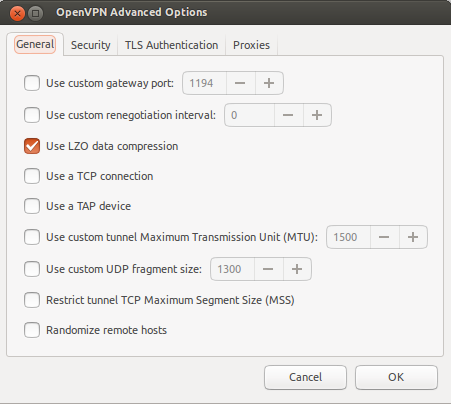
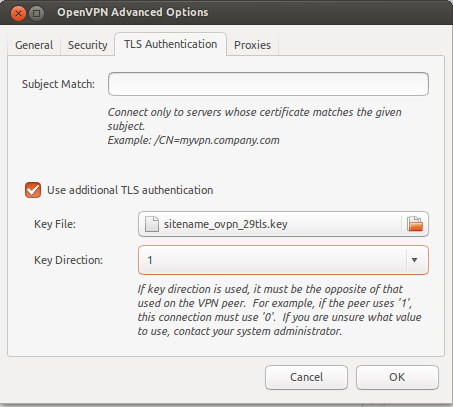
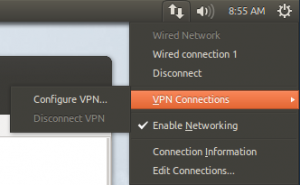
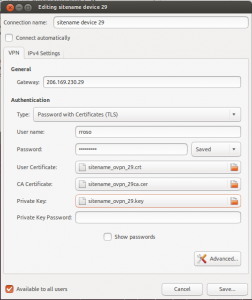
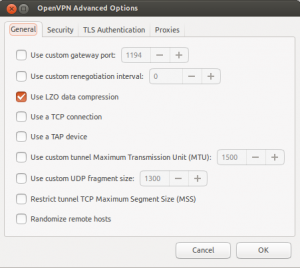
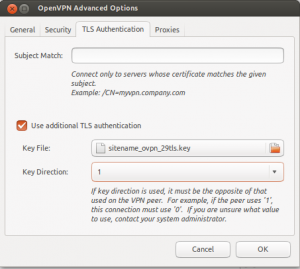
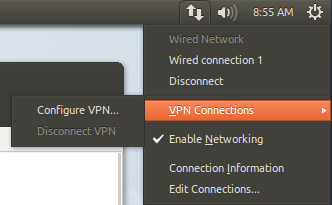
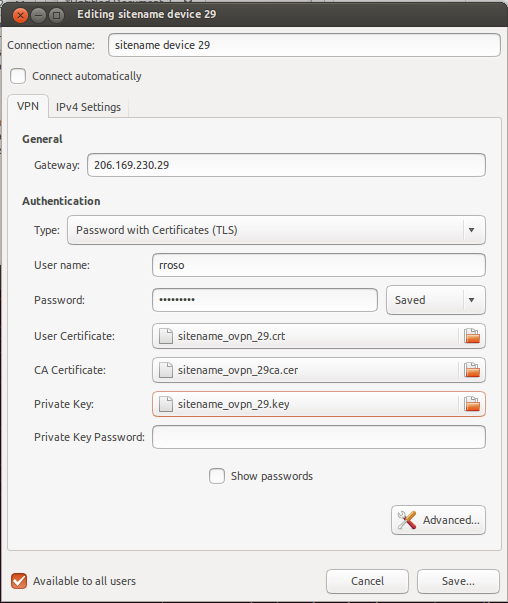
Below are some screen shots showing some configuration settings fro this particular setup. Your mileage may vary depending on how your administrator configured the server.


Add a new VPN Connection in GNOME:

Reference certificates and keys:

General Settings:

TLS Key:
Showing syslog while connecting (snipped):

Nov 22 08:49:42 u12 NetworkManager[660]:  Starting VPN service 'openvpn'...
Nov 22 08:49:43 u12 nm-openvpn[4791]: Control Channel Authentication: using '/home/rrosso/sitename_ovpn_29tls.key' as a OpenVPN static key file
Nov 22 08:49:43 u12 nm-openvpn[4791]: LZO compression initialized
Nov 22 08:49:47 u12 NetworkManager[660]:  IPv4 configuration:
Nov 22 08:49:47 u12 NetworkManager[660]:  Internal Gateway: 172.22.91.1
Nov 22 08:49:47 u12 NetworkManager[660]:  Internal Address: 172.22.91.253
Nov 22 08:49:47 u12 NetworkManager[660]:  Internal Prefix: 24
Nov 22 08:49:48 u12 NetworkManager[660]:  VPN connection 'sitename device 29' (IP Config Get) complete.
Nov 22 08:49:48 u12 NetworkManager[660]:  ((null)): writing resolv.conf to /sbin/resolvconf
Nov 22 08:49:49 u12 dbus[402]: [system] Activating service name='org.freedesktop.nm_dispatcher' (using servicehelper)
Nov 22 08:49:52 u12 nm-openvpn[4791]: Initialization Sequence Completed
Nov 22 08:50:08 u12 ntpdate[4876]: step time server 91.189.94.4 offset 9.301349 sec

Older (pre Ubuntu 12.04) information.  May or may not be useful to you.

How to test a manual connection(no Network Manager plug-in):

rrosso@u10:~$ sudo openvpn --config client.ovpn --script-security 2
Sat Mar 19 10:14:34 2011 OpenVPN 2.1.0 x86_64-pc-linux-gnu [SSL] [LZO2] [EPOLL] [PKCS11] [MH] [PF_INET6] [eurephia] built on Jul 12 2010
Enter Auth Username:rrosso
Enter Auth Password:
...

Older versions of Ubuntu and NetworkManager this was a necessary addition to set DNS:

rrosso@u10:~$ tail -3 client.ovpn
#rrosso added for DNS resolver
up /etc/openvpn/update-resolv-conf
down /etc/openvpn/update-resolv-conf

Several problems I encountered with permissions on older versions:
- NetworkManager: <WARN> vpn_service_watch_cb()
- VPN service 'org.freedesktop.NetworkManager.openvpn' exited with error: 1
- connection_need_secrets_cb()

https://bugs.launchpad.net/ubuntu/+source/network-manager-openvpn/+bug/360818

Debug NetworkManager as follow:
http://live.gnome.org/NetworkManager/Debugging

# OPENVPN_DEBUG=1 /usr/lib/network-manager-openvpn/nm-openvpn-service

http://bugs.debian.org/cgi-bin/bugreport.cgi?bug=527975
https://bugs.launchpad.net/ubuntu/+source/network-manager-vpnc/+bug/360818

** Not sure if tinkering with this next file helped but changed it to look as follow and could at least troubleshoot further after wards.

Permissions problem:

# cat /etc/dbus-1/system.d/nm-openvpn-service.conf
<!DOCTYPE busconfig PUBLIC
"-//freedesktop//DTD D-BUS Bus Configuration 1.0//EN"
"http://www.freedesktop.org/standards/dbus/1.0/busconfig.dtd">
<busconfig>
<policy user="root">
<allow own="org.freedesktop.NetworkManager.openvpn"/>
<allow send_destination="org.freedesktop.NetworkManager.openvpn"/>
</policy>
</busconfig>

** I restored the original file and things are still working

Some older links on DNS resolver and OpenVPN:
http://www.subvs.co.uk/openvpn_resolvconf
http://forums.openvpn.net/topic7109.html
Comments Off on OpenVPN with Gnome NetworkManager plug-in
comments