May 24

Hiding Passwords in Scripts

Sometimes you need to pass a password or even just a string on the command line which you would rather obscure.  For example:

serverControl.sh -u admin -p $MYPASS -c shutdown

Note anything below is not the ideal way of dealing with passwords you should probably use SSH keys if possible instead.

Sometimes you really do not have a better option and this might be your only option.  Still it is a weak solution though to store passwords.  I simplified but you probably don't want to use obvious variable names or files either.

Very simple base64 encoding:

$ echo "passwd" | base64
cGFzc3dkCg==
$ echo "cGFzc3dkCg==" | base64 --decode
passwd

# Use in script as follow or better use a file to store the string:
MYENCPASS="cGFzc3dkCg==" 
MYPASS=`echo "$MYENCPASS" | base64 --decode`

Using aesutil:

I saw someone mention aesutil on the Internet but it appears like few modern Linux distros comes with aesutil tools though.

# mkrand generates a 15-character random
$ SALT=`mkrand 15` passwd

$ `echo "passwd" | aes -e -b -B -p $SALT`
i/b9pkcpQAPy7BzH2JlqHVoJc2mNTBM=

# Use in script as follow or use a file to store the string:
MYENCPASS="i/b9pkcpQAPy7BzH2JlqHVoJc2mNTBM=" 
MYPASS=`echo "$MYENCPASS" | aes -d -b -p $SALT`

Or maybe openssl is an option:

This is still very lame as you still have to use a password for the opensssl command.   I just named it garbageKey but you are probably better off making it more obscure.

# Test
$ echo 'mySecretPassword' | openssl enc -base64 -e -aes-256-cbc -nosalt  -pass pass:garbageKey
yQA4stTBI8njgNgdmttwjlcFrywQD4XEIgK8HzqEOxI=
$ echo 'yQA4stTBI8njgNgdmttwjlcFrywQD4XEIgK8HzqEOxI=' | openssl enc -base64 -d -aes-256-cbc -nosalt -pass pass:garbageKey
mySecretPassword

# Use a hidden file
$ echo 'mySecretPassword' | openssl enc -base64 -e -aes-256-cbc -nosalt  -pass pass:garbageKey > .hidden.lck 
$ cat .hidden.lck 
yQA4stTBI8njgNgdmttwjlcFrywQD4XEIgK8HzqEOxI=

# In a script
$ MYENCPASS=`cat .hidden.lck | openssl enc -base64 -d -aes-256-cbc -nosalt -pass pass:garbageKey`
$ echo $MYENCPASS
mySecretPassword

As you can see in the last example I used a hidden file also instead of keeping the encryption string in the file.
1
comments

May 22

Solaris 11.1 Using Wget for Oracle Software Downloads

Following is my notes on several Solaris 11 procedures.  I just bunched it together but you may just need one of them and most unlikely all of them at the same time.

** Of course you need to comply with Oracle licensing when downloading software and need an OTN account.

Index

  1. Using wget to download a support patch from Oracle support site.
  2. Installing a package in Solaris 11 but no Solaris 11 repo access and incremental repo shows dependency failures.  Meaning we need a full repo also to meet dependencies.
  3. Downloading with wget from Oracle Edelivery using cookies.

1. Downloading from Oracle support using wget.

(In this example I grabbed Solaris 11.1 SRU 19.6)

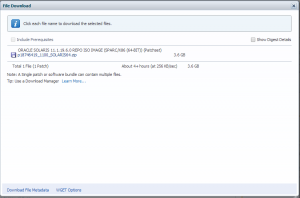
Patch 18746419: ORACLE SOLARIS 11.1.19.6.0 REPO ISO IMAGE (SPARC/X86 (64-BIT))

oracle_wget_option

Download the “WGET Options” file at the bottom.  Set your password in the script and run the script.

# grep ^SSO_P wgetsru19.6.sh
SSO_PASSWORD=

Inside the wget script the actual wget will look something like this:

$WGET --user-agent="Mozilla/5.0" --load-cookies=$COOKIE_FILE --save-cookies=$COOKIE_FILE --keep-session-cookies "https://updates.oracle.com/Orion/Services/download/p18746419_1100_SOLARIS64.zip?aru=17658104&patch_file=p18746419_1100_SOLARIS64.zip" -O $OUTPUT_DIR/p18746419_1100_SOLARIS64.zip


  1. Installing a package in Solaris 11

    Keeping in mind I have no Solaris 11 online repo access and using only the incremental repo shows dependency failures.  Meaning we need a full repo (either online or iso) to meet dependencies.

I was trying to install VNC server and in my case I only had the SRU 19.6 incremental CD repo to work with.  So I had to go get the full repo also to satisfy dependencies.

# lofiadm -a /software/solaris/sol-11_1_18_5_0-incr-repo.iso
/dev/lofi/1
# mount -o ro -F hsfs /dev/lofi/1 /mnt
# pkg set-publisher -g file:///mnt/repo solaris
# pkg publisher
PUBLISHER      TYPE      STATUS P    LOCATION
solaris        origin    online F    file:///mnt/repo/
# pkg install pkg:/x11/server/xvnc@1.1.0-0.175.1.17.0.3.1348
Creating Plan (Solver setup): /
pkg install: No matching version of x11/server/xvnc can be installed:
Reject: pkg://solaris/x11/server/xvnc@1.1.0,5.11-0.175.1.17.0.3.1348:20140221T230347Z
Reason: A version for 'require' dependency on pkg:/x11/keyboard/xkbcomp cannot be found

Normally you can at this point just add the Oracle online server repo from pkg.oracle.com.  But in my case this specific host is firewalled off and no http outbound access allowed.  If you did have http outbound you could end up with below and it should work:

# pkg publisher
PUBLISHER                   TYPE     STATUS P LOCATION
solaris                     origin   online F file:///mnt/repo/
solaris                     origin   online F http://pkg.oracle.com/solaris/release/


  1. A) Downloading with wget from Oracle Edelivery using cookies.

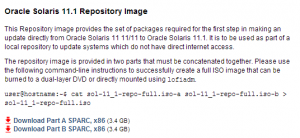
 I am proceeding to download the following full repo.  You can also download this in a browser but I did not want to download to my desktop and turn around and upload through a VPN connection so I wanted wget to download straight to the server.

** More on cookies and edelivery here: http://www.pythian.com/blog/how-to-download-oracle-software-using-wget-or-curl/

Files are here: http://www.oracle.com/technetwork/server-storage/solaris11/downloads/index.html

solaris11_full_repo

# wget --load-cookies=./cookies.txt --no-check-certificate "http://download.oracle.com/otn/solaris/11_1/sol-11_1-repo-full.iso-a"

# wget --load-cookies=./cookies.txt --no-check-certificate <a href="http://download.oracle.com/otn/solaris/11_1/sol-11_1-repo-full.iso-b">http://download.oracle.com/otn/solaris/11_1/sol-11_1-repo-full.iso-b</a>

# cat sol-11_1-repo-full.iso-a sol-11_1-repo-full.iso-b &gt; sol-11_1-repo-full.iso


3. B) Now let’s install the software

# lofiadm -a /software/solaris/sol-11_1-repo-full.iso
/dev/lofi/2
# mount -o ro -F hsfs /dev/lofi/2 /sol11
# ls /sol11/
COPYRIGHT  NOTICES    README     repo
# pkg set-publisher -g file:///sol11/repo solaris
# pkg publisher
PUBLISHER                   TYPE     STATUS P LOCATION
solaris                     origin   online F file:///mnt/repo/
solaris                     origin   online F file:///sol11/repo/

# pkg install pkg:/x11/server/xvnc@1.1.0-0.175.1.17.0.3.1348
Packages to install: 35
Create boot environment: No
Create backup boot environment: No
Services to change:  5

DOWNLOAD                                PKGS         FILES    XFER (MB)   SPEED
Completed                              35/35     2305/2305    26.2/26.2    0B/s

PHASE                                          ITEMS
Installing new actions                     3341/3341
Updating package state database                 Done
Updating image state                            Done
Creating fast lookup database                   Done

# pkg unset-publisher solaris
# pkg publisher
PUBLISHER                   TYPE     STATUS P LOCATION
# umount /sol11/
# rmdir /sol11/
# umount /mnt
# lofiadm -d /dev/lofi/2
# lofiadm -d /dev/lofi/1


Comments Off on Solaris 11.1 Using Wget for Oracle Software Downloads
comments

Apr 11

VNC Server on a minimal Solaris 10 Server

I generally prefer installing server with a very minimal footprint and just add what is necessary. Think small templates etc..

Solaris 10 can be a bit difficult to add software. More modern package management systems like IPS or APT / YUM in the Linux world makes this much easier.

Here is what I had to do to get vncserver running after a very minimal Solaris 10 install. Out of scope is getting a CD with software mounted. MY CD was mounted under /mnt so the packages were located in /mnt/Solaris_10/Product.

VNC Server and dependencies

# pkgadd -d . SUNWxvnc SUNWxwfnt SUNWxorg-xkb SUNWxwplt SUNWxorg-clientlibs SUNWxorg-server

xauth required for vncserver binary

# pkgadd -d . SUNWxwplt SUNWxwice SUNWxwrtl SUNWxwplr

Will need twm for at least a minimal window manager for a xterm. Gives twm in /usr/openwin/bin

# pkgadd -d . SUNWxwopt

Will need the path for xauth and twm to fire.

# grep PATH .profile
export PATH=/usr/bin:/usr/sbin
PATH=$PATH:/usr/X11/bin:/usr/openwin/bin
export PATH

For reference here is where vnc pulls xterm.

# cat .vnc/xstartup
#!/bin/sh

[ -r $HOME/.Xresources ] && xrdb $HOME/.Xresources
xsetroot -solid grey
vncconfig -iconic &
#xterm -geometry 80x24+10+10 -ls -title "$VNCDESKTOP Desktop" &
xterm -geometry 120x34+10+10 -ls -title "$VNCDESKTOP Desktop" &
twm &

Comments Off on VNC Server on a minimal Solaris 10 Server
comments

Mar 27

Howto grab additional lines when grep is ancient

In modern grep utilities can use -A (after) and -B (before) to return additional lines from your search. Solaris 11 still does not have a grep that can do this. Several options exist but this is one that worked for me.

Example output without grep. I wanted Vendor and one extra line after for Size.

# iostat -E
[...]
ssd24     Soft Errors: 0 Hard Errors: 0 Transport Errors: 0
Vendor: 3PARdata Product: VV               Revision: 3123 Serial No: 1203842
Size: 268.44GB <268435456000 bytes>
Media Error: 0 Device Not Ready: 0 No Device: 0 Recoverable: 0
Illegal Request: 0 Predictive Failure Analysis: 0
ssd25     Soft Errors: 0 Hard Errors: 0 Transport Errors: 0
Vendor: 3PARdata Product: VV               Revision: 3123 Serial No: 1203842
Size: 273.80GB <273804165120 bytes>
Media Error: 0 Device Not Ready: 0 No Device: 0 Recoverable: 0
[..]

One possible way with awk. "ssd" was my start and "2" was my number of lines after.

# iostat -E | awk '/'"ssd"'/{l=1;count=NR;next} l>0 && NR-count < '"2"+1' {print}'
Vendor: 3PARdata Product: VV Revision: 3123 Serial No: .....
Size: 268.44GB
Vendor: 3PARdata Product: VV Revision: 3123 Serial No: .....
Size: 273.80GB
Vendor: 3PARdata Product: VV Revision: 3123 Serial No: .....
Size: 536.87GB
Vendor: SUN Product: ZFS Storage 7330 Revision: 1.0 Serial No:
Size: 37.58GB

Comments Off on Howto grab additional lines when grep is ancient
comments

Mar 24

SPICE and QXL Display for KVM Guests

Very short note on how I used SPICE for accessing a Windows 7 desktop running under KVM.  SPICE and QXL provides improved Graphics experience in the guest.

I found more detailed information here: http://www.linux-kvm.org/page/SPICE

In virt manager when editing the guest look under Display Spice heading:
- Type  == Spice Server
- Address  == All interfaces
** I tried to set the port manually but it keeps defaulting back to Auto.

# virsh dumpxml win7-2 | grep spice
    <channel type='spicevmc'>
      <target type='virtio' name='com.redhat.spice.0'/>
    <graphics type='spice' port='5901' autoport='yes' listen='0.0.0.0'>
    <redirdev bus='usb' type='spicevmc'>
...

Install tools in Windows guest tools:
Download and install here http://www.spice-space.org/download.html

At the time I installed spice-guest-tools-0.74.exe was current. Since this is a KVM guest I already use the virtio drivers for the network interface and disk. The spice guest tools install additional drivers like VIRTIO Balloon Driver and VIRTIO-Serial Driver.

From the remote desktop access as follow:
# apt-get install virt-viewer spice-client-gtk
$ remote-viewer spice://192.168.10.10:5901

Hints:
** As mentioned I could not set the port manually for some reason so I had to go look on the KVM host process list to see which port was being used.
** Also make sure you don't have a firewall blocking the port you are after.

Comments Off on SPICE and QXL Display for KVM Guests
comments

Mar 24

Virtualbox and Windows OEM Guest

Sometimes you have a Window client sitting around running an important piece of software and the hardware is ancient. All you want to do is run this OS + critical application AS-IS and not risk the hardware failing. And yes you should upgrade, migrate whatever but that is just not in scope for you at the moment. Virtualization is ideal but Microsoft licensing might make it difficult. I am still unclear if it is legal or not to run an OEM Windows OS inside a virtual machine.

If you have no other option and virtualization is the only choice this post might come in handy when you are bumping into Windows Activation issues and using Virtualbox.  I am sure other virtualization solutions have their own options to simulate BIOS configurations.

You can play with simulating the PC BIOS (read further down). Or you can also try the SLIC ACPI table option.

For my test the SLIC option worked.

Using SLIC tables:

$ VBoxManage setextradata win7 "VBoxInternal/Devices/acpi/0/Config/CustomTable" "/tmp/SLIC"

That worked!!

Trying on a completely different Virtualbox host (different physical attributes).

$ VBoxManage setextradata win7-vostro "VBoxInternal/Devices/acpi/0/Config/CustomTable" "/DATA/VirtualBox/Machines/win7-vostro/SLIC"

If you need to play with emulating your BIOS:

# dmidecode -t0
# dmidecode 2.12
SMBIOS 2.5 present.

Handle 0x0001, DMI type 0, 24 bytes
BIOS Information
Vendor: Dell Inc.
Version: A08
Release Date: 03/05/2010
Address: 0xE2480
Runtime Size: 121728 bytes
ROM Size: 64 kB
Characteristics:
ISA is supported
PCI is supported
PC Card (PCMCIA) is supported
PNP is supported
BIOS is upgradeable
BIOS shadowing is allowed
ESCD support is available
Boot from CD is supported
ACPI is supported
USB legacy is supported
AGP is supported
BIOS boot specification is supported
Targeted content distribution is supported
BIOS Revision: 1.1
Firmware Revision: 1.1

# dmidecode -t1
# dmidecode 2.12
SMBIOS 2.5 present.

Handle 0x0002, DMI type 1, 27 bytes
System Information
Manufacturer: Dell Inc.
Product Name: Vostro 1520
Version: Null
Serial Number: 30Z90M1
UUID: 44454C4C-3000-105A-8039-B3C04F304D31
Wake-up Type: Power Switch
SKU Number: Null
Family: Vostro

An example:

VBoxManage setextradata WINXP2 "VBoxInternal/Devices/pcbios/0/Config/DmiBIOSVendor" "Dell Inc."
VBoxManage setextradata WINXP2 "VBoxInternal/Devices/pcbios/0/Config/DmiBIOSVersion" "1.0.3"
VBoxManage setextradata WINXP2 "VBoxInternal/Devices/pcbios/0/Config/DmiBIOSReleaseDate" "06/20/2008"
VBoxManage setextradata WINXP2 "VBoxInternal/Devices/pcbios/0/Config/DmiBIOSReleaseMajor" 2
VBoxManage setextradata WINXP2 "VBoxInternal/Devices/pcbios/0/Config/DmiBIOSReleaseMinor" 1
VBoxManage setextradata WINXP2 "VBoxInternal/Devices/pcbios/0/Config/DmiBIOSFirmwareMajor" 2
VBoxManage setextradata WINXP2 "VBoxInternal/Devices/pcbios/0/Config/DmiBIOSFirmwareMinor" 1
VBoxManage setextradata WINXP2 "VBoxInternal/Devices/pcbios/0/Config/DmiSystemVendor" "Dell Inc."
VBoxManage setextradata WINXP2 "VBoxInternal/Devices/pcbios/0/Config/DmiSystemProduct" "Vostro 410"
VBoxManage setextradata WINXP2 "VBoxInternal/Devices/pcbios/0/Config/DmiSystemVersion" "<EMPTY>"
VBoxManage setextradata WINXP2 "VBoxInternal/Devices/pcbios/0/Config/DmiSystemSerial" "DJX9DH1"
VBoxManage setextradata WINXP2 "VBoxInternal/Devices/pcbios/0/Config/DmiSystemFamily" "86-based PC"
VBoxManage setextradata WINXP2 "VBoxInternal/Devices/pcbios/0/Config/DmiSystemUuid" "44454C4C-4A00-1058-8039-C4C04F444831"

<span style="text-decoration: underline;"><strong>I set mine as follow:</strong></span>
[bash]
VBoxManage setextradata win7 "VBoxInternal/Devices/pcbios/0/Config/DmiBIOSVendor" "Dell Inc."
VBoxManage setextradata win7 "VBoxInternal/Devices/pcbios/0/Config/DmiBIOSVersion" "A08"
VBoxManage setextradata win7 "VBoxInternal/Devices/pcbios/0/Config/DmiBIOSReleaseDate" "03/05/2010"
VBoxManage setextradata win7 "VBoxInternal/Devices/pcbios/0/Config/DmiBIOSReleaseMajor" 1
VBoxManage setextradata win7 "VBoxInternal/Devices/pcbios/0/Config/DmiBIOSReleaseMinor" 1
VBoxManage setextradata win7 "VBoxInternal/Devices/pcbios/0/Config/DmiBIOSFirmwareMajor" 1
VBoxManage setextradata win7 "VBoxInternal/Devices/pcbios/0/Config/DmiBIOSFirmwareMinor" 1
VBoxManage setextradata win7 "VBoxInternal/Devices/pcbios/0/Config/DmiSystemVendor" "Dell Inc."
VBoxManage setextradata win7 "VBoxInternal/Devices/pcbios/0/Config/DmiSystemProduct" "Vostro 1520"
VBoxManage setextradata win7 "VBoxInternal/Devices/pcbios/0/Config/DmiSystemVersion" "<EMPTY>"
VBoxManage setextradata win7 "VBoxInternal/Devices/pcbios/0/Config/DmiSystemSerial" "30Z90M1"
VBoxManage setextradata win7 "VBoxInternal/Devices/pcbios/0/Config/DmiSystemFamily" "86-based PC"
VBoxManage setextradata win7 "VBoxInternal/Devices/pcbios/0/Config/DmiSystemUuid" "44454C4C-3000-105A-8039-B3C04F304D31"

Links:
https://forums.virtualbox.org/viewtopic.php?f=5&t=21471
https://www.virtualbox.org/ticket/9231

Comments Off on Virtualbox and Windows OEM Guest
comments

Mar 24

FirewallD on Fedora

Somewhere between Fedora 18 and 20 the default firewall switched to FirewallD.  FirewallD is a replacement to the default iptables firewall.  Lots more detail at the links referenced below but in my mind the big advantages are zones and the fact that changes can be made to the running firewall without restart, load, unload and therefore becomes stateful.

This is just a quick reminder for myself to what I did to add a port to the public zone.  I was setting up SPICE for accessing a Windows 7 KVM guest and needed the firewall to allow port 5901.

I will play with the other zones at some point. Ideally I don't want to allow 5901 to the public zone just the internal zone.

Get some information on the FirewallD service.

# systemctl | grep firewall
firewalld.service                                                                                          loaded active running   firewalld - dynamic firewall daemon

# firewall-cmd --state
running

#  firewall-cmd --get-zones
block dmz drop external home internal public trusted work

#  firewall-cmd --get-services
amanda-client bacula bacula-client dhcp dhcpv6 dhcpv6-client dns ftp high-availability http https imaps ipp ipp-client ipsec kerberos kpasswd ldap ldaps libvirt libvirt-tls mdns mountd ms-wbt mysql nfs ntp openvpn pmcd pmproxy pmwebapi pmwebapis pop3s postgresql proxy-dhcp radius rpc-bind samba samba-client smtp ssh telnet tftp tftp-client transmission-client vnc-server wbem-https

#  firewall-cmd --get-default-zone
public

Add the vnc-server service that covers the ports I am interested in. Add rules also to the permanent profile not just running profile.

# firewall-cmd --zone=public --add-service=vnc-server
success

# firewall-cmd --permanent --zone=public --add-service=vnc-server
success

# firewall-cmd --reload
success

Hints:
You can also use firewall-config which is a native firewall GUI.
Using nmap to verify the open ports.

More detail here:
https://fedoraproject.org/wiki/Features/firewalld-default
https://fedoraproject.org/wiki/FirewallD?rd=FirewallD/

Comments Off on FirewallD on Fedora
comments

Feb 24

Virtualbox Guest Additions on Ubuntu 14.04

Just a few notes on getting the VirtualBox Guest Additions to work on Ubuntu 14.04 alpha1.

1. Unknown version of X
"Installing the Window System drivers
Warning: unknown version of the X Window System installed. Not installing
X Window System drivers."

Explanation at the following links.  You need to use a newer version of the Guest Additions.

virtualbox and the latest 14.04… display stuck at low resolution


https://www.virtualbox.org/ticket/12623

2. Headers for the running kernel not installed.

http://askubuntu.com/questions/98416/error-kernel-headers-not-found-but-they-are-in-place

The message is misleading.  In my case it was actually missing dkms so before you install the addition run
sudo apt-get install build-essential linux-headers-`uname -r` dkms

Above helped with getting the Guest Additions running but still had some issue.  Looks like graphics resolution is ok but Unity not running.  I will investigate and update more.

Comments Off on Virtualbox Guest Additions on Ubuntu 14.04
comments

Feb 12

Python Split Using Space vs None Separator

Quick reminder of how to split a "ls -l" listing. It is problematic because the last field which is the directory or file name can have spaces itself, so splitting on spaces which is the only option here still need a bit of additional work.

import config
import subprocess

## First experiment doing manual manipulation of the fields.  
## Basically split on all spaces and then assemble the file name.
def dir_listing():
  ls_lines = subprocess.check_output(['ls', '-l']).splitlines()
  ls_arr= []
  for item in ls_lines:
    if not "total" in item:
      f = item.split()
      ## fname = item.join(str(v) for v in item.index if v > 7)
      fname = ""
      for idx,val in enumerate(f):
        if idx > 7:
          fname = fname + str(val) + " "
      fname = fname[:-1]
      ls_fields = [f[0],f[1],f[2],f[3],f[4],f[5]+"-"+f[6]+"-"+f[7],fname]
      ls_arr.append(ls_fields)
  return ls_arr

## Second attempt is split on spaces with a max split defined. 
## This sounds like the obvious way to do this but I needed to use "None" and not " "
## as shown below.
def dir_listing_optimized():
  ls_lines = subprocess.check_output(['ls', '-l']).splitlines()
  ls_arr= []
  for item in ls_lines:
    if not "total" in item:
      ## None will use arbitrary strings of whitespace characters (space, tab, newline, return, formfeed)
      ## When using split(" ",8) I had more separation than I expected and therefor my last field 
      ## was not working right.
      f = item.split(None,8)
      ls_arr.append(f)
  return ls_arr

for dir in dir_listing():
  print dir

for dir in dir_listing_optimized():
  print dir

Comments Off on Python Split Using Space vs None Separator
comments

Feb 10

webpy Example

A short write up on how to bootstrap a webpy app and at the same time show how to make a system call with popen.  I based this short app on the skeleton example here: http://webpy.org/skeleton/0.3

Just a note on where my test live for my own reference later.

$ pwd
/DATA/src/hvInfo

$ ls
call1.py call.pyc config.pyc hvInfo.pyc my test with spaces_ and more... templates view.pyc web.py-0.37
call.py config.py hvInfo.py index.html simpleHTTP.py view.py web web.py-0.37.tar

Main python app:

hvInfo.py

import web
import view, config
from view import render

urls = (
  '/', 'index'
)

class index:
  def GET(self):
    return render.base(view.listing())

if __name__ == "__main__": 
  app = web.application(urls, globals())
  app.run()

Define some functions here:

call.py

import config
#from subprocess import Popen, PIPE
import subprocess

def listing_experiment1():
    cmd = "ls -l ~/"
    p = Popen(cmd , shell=True, stdout=PIPE, stderr=PIPE)
    #out, err = p.communicate()
    #print "Return code: ", p.returncode
    #return out.rstrip(), err.rstrip()
    outputlines = filter(lambda x:len(x)>0,(line.strip() for line in p.stdout))
    return outputlines
    #return out.replace('\n','<br>')

    ##return config.DB.select('items', **k)

def dir_listing():
  ## http://stackoverflow.com/questions/8880461/python-subprocess-output-to-list-or-file
  ls_lines = subprocess.check_output(['ls', '-l']).splitlines()
  ## I want to pass output as separate fields but space as a delimiter won't do the trick since filenames can have spaces...
  ls_arr= []
  for item in ls_lines:
    if not "total" in item:
      f = item.split()
      #fname = item.join(str(v) for v in item.index if v > 7)
      fname = ""
      for idx,val in enumerate(f):
        if idx > 7:
          fname = fname + str(val) + " "
      fname = fname[:-1]
      ls_fields = [f[0],f[1],f[2],f[3],f[4],f[5]+"-"+f[6]+"-"+f[7],fname]
      ls_arr.append(ls_fields)
  return ls_arr

Lets maintain a config file. Especially when DB access becomes necessary.

config.py

import web
#DB = web.database(dbn='postgres', db='appname', user='username', pw='')
cache = False

Following MVC type framework.  It makes sense to keep presentation separate.

view.py

import web
import call
import config

t_globals = dict(
  datestr=web.datestr,
)
render = web.template.render('templates/', cache=config.cache, 
    globals=t_globals)
render._keywords['globals']['render'] = render

def listing():
    l = call.dir_listing()
    return render.listing(l)

Templates as follow:

$ cat templates/base.html
$def with (page, title=None)
<html><head>
<title>hvInfo\
$if title: : $title\
</title>
</head><body>
<h1><a href="/">hvInfo</a></h1>
$:page   
</body></html>
$ cat templates/listing.html
$def with (items)
  <table>
  $for item in items:
    <tr><td>$item[0]<td>$item[1]<td>$item[2]<td>$item[3]<td>$item[4]<td>$item[5]<td><b>$item[6]</b>
  </table>
$ cat templates/item.html
$def with (item)

$item

Run web server as follow:

$ python hvInfo.py
http://0.0.0.0:8080/

Test in browser at this link: http://localhost:8080/

Comments Off on webpy Example
comments