Author Archive

Jan 22

AWS API and Python Boto

Quick note on connection to EC2 to list instances.

- Ensure IAM User permissions. In my case I tried EC2FullAccess.
- Ensure you have your access and secret key handy.
- This example just cycle through regions and list any instances.

import argparse
import boto.ec2

access_key = ''
secret_key = ''

def get_ec2_instances(region):
    ec2_conn = boto.ec2.connect_to_region(region,
                aws_access_key_id=access_key,
                aws_secret_access_key=secret_key)
    reservations = ec2_conn.get_all_reservations()
    for reservation in reservations:    
        print region+':',reservation.instances

    for vol in ec2_conn.get_all_volumes():
        print region+':',vol.id

def main():
    regions = ['us-east-1','us-west-1','us-west-2','eu-west-1','sa-east-1',
                'ap-southeast-1','ap-southeast-2','ap-northeast-1']
    parser = argparse.ArgumentParser()
    parser.add_argument('access_key', help='Access Key');
    parser.add_argument('secret_key', help='Secret Key');
    args = parser.parse_args()
    global access_key
    global secret_key
    access_key = args.access_key
    secret_key = args.secret_key
    
    for region in regions: get_ec2_instances(region)

if __name__ =='__main__':main()

Example:

$ python list.py myaccess_key mysecret_key
us-east-1: [Instance:i-1aac5699]
us-east-1: vol-d121290e

Comments Off on AWS API and Python Boto
comments

Jan 22

Python Dict for Arrays

Some more examples of Python dicts and array general use.

import pprint

###  Example python dict as an associative multi array
###  Example is using an unique key
pp = pprint.PrettyPrinter(indent=2)

table = {}
table[1]={'LastName':'Sable','name':'Sam'}
table[2]={'LastName':'Sable','name':'Samantha'}
table[3]={'LastName':'Sable','name':'Stevie'}

pp.pprint(table)

print table[2]
print table[3]['name']

Comments Off on Python Dict for Arrays
comments

Jan 20

Oracle VM (OVM) REST Api

############################################################################################
Update 20180331:
I tried a couple things from the comment section and can add the following:

@chaitanya: ovcmclient worked for me also with create and clone

@Dave: that still gave me the same errors and I am using documentation as its here https://docs.oracle.com/cd/E50245_01/E50253/html/vmprg-rest-example-vm-create-python.html

@Jeff: try chaitanya's suggestion python-ovmclient it worked for me
############################################################################################

Previous article here:

Oracle OVM rest api example

I am adding a slightly updated script here even though I could not get POST (Create new VM) and PUT (Clone VM) to work yet.

Using a module for most functions.

import json
from time import sleep

def get_id_from_name(s,baseUri,obj,name):
  #sp_id=get_id_from_name(s,baseUri,'ServerPool','ovs-home')
  r=s.get(baseUri+'/'+obj)
  for i in r.json():
    if i['name'] == name:
      id = i['id']['value']
  return id

def wait_for_job(joburi,s):
        while True:
            time.sleep(1)
            r=s.get(joburi)
            job=r.json()
            if job['summaryDone']:
                print '{name}: {runState}'.format(name=job['name'], runState=job['jobRunState'])
                if job['jobRunState'].upper() == 'FAILURE':
                    raise Exception('Job failed: {error}'.format(error=job['error']))
                elif job['jobRunState'].upper() == 'SUCCESS':
                    if 'resultId' in job:
                        return job['resultId']
                    break
                else:
                    break     

def check_manager_state(baseUri,s):
  #https://hostname:port/ovm/core/wsapi/rest/Manager
  while True:
    r=s.get(baseUri+'/Manager')
    manager=r.json()
    if manager[0]['managerRunState'].upper() == 'RUNNING':
      break
      time.sleep(1)
      return;

def serverList(s,baseUri):
  print "\nServer List:"
  print "##############"
  r=s.get(baseUri+'/Server')
  for i in r.json():
    # do something with the content
    print '{:20} {:20}'.format(i['serverRunState'],i['name'])

def vmList(s,baseUri):
  print "\nVM List:"
  print "########"
  r=s.get(baseUri+'/Vm')
  for i in r.json():
    # print '{:20} {:20}'.format(i['vmRunState'],i['name'])
    print '{:20} {:35} {:30}'.format(i['vmRunState'],i['name'],i['id']['value']),
    for d in i['vmDiskMappingIds']:
      print d['value'],
    print
    # print '{name} '.format(name=i['name'])
    # print i

def showVm(s,baseUri,name):
  print "\nVM Show:"
  print "##########"
  r=s.get(baseUri+'/Vm')
  for i in r.json():
    if i['name'] == name:
      print '{:20} {:55}'.format(i['vmRunState'],i['name']), 
      for d in i['vmDiskMappingIds']:
	if 'CDROM' not in d['name']:
          print d['value'],
          disk=s.get(baseUri+'/VmDiskMapping/'+d['value'])
	  d = disk.json()
	  if "obiee" in d['virtualDiskId']['name']:
	    dName = d['virtualDiskId']['name'].replace('obiee_template',i['name'])
	    dName = dName.split('img')[0]+'img'
    	    print 'value: {} and name {} should be renamed -> {}'.format(d['virtualDiskId']['value'],d['virtualDiskId']['name'],dName),
	    print

def cmdVm(s,baseUri,cmd,name):
  print "\nVM " + cmd
  print "##########"
  vm_id=get_id_from_name(s,baseUri,'Vm',name)
  print vm_id
  r=s.put(baseUri+'/Vm/'+vm_id+'/'+cmd)
  job=r.json()
  # print job
  # wait for the job to complete
  vm_id=wait_for_job(job['id']['uri'],s)

def updateVm(s,baseUri,name):
  print "\nVM Update Vm Disk Names:"
  print "##########################"
  r=s.get(baseUri+'/Vm')
  for i in r.json():
    if i['name'] == name:
      #print i
      print '{:20} {:20} {:55}'.format(i['id']['value'],i['vmRunState'],i['name'])
      for disk in i['vmDiskMappingIds']:
        if 'CDROM' not in disk['name']:
          #print disk['value'],
          value=s.get(baseUri+'/VmDiskMapping/'+disk['value'])
          d = value.json()
	  oldName = d['virtualDiskId']['name']
          newName = d['virtualDiskId']['name'].replace('obiee_template',i['name'])
          newName = newName.split('img')[0]+'img'
	  d['virtualDiskId']['name']=newName
	  d['id']['name']=newName
	  d['name']=newName
          
          #print 'value: {:20} name: {:55} new name {}'.format(d['virtualDiskId']['value'],d['virtualDiskId']['name'],dName),
          print 'value: {:20} name: {:55} new name {}'.format(disk['value'],oldName,newName)
          #print d
          uri='{base}/VmDiskMapping/{id}'.format(base=baseUri,id=d['id']['value'])
	  #print uri
          r1=s.put(uri,data=json.dumps(d))
          job=r1.json()
    	  #print job
          # wait for the job to complete
          wait_for_job(job['id']['uri'],s)

      i['vmDiskMappingIds'][0]['name']='new.img'
      #print i
      uri='{base}/Vm/{id}'.format(base=baseUri,id=i['id']['value'])
      #print uri
      
      r=s.put(uri,data=json.dumps(i))
      job=r.json()
      #print job
      # wait for the job to complete
      wait_for_job(job['id']['uri'],s)

def updateVmMemory(s,baseUri,name,memory):
  print "\nVM Update Vm Memory for " + name
  print "########################################"
  vm_id=get_id_from_name(s,baseUri,'Vm',name)
  uri='{base}/Vm/{id}'.format(base=baseUri,id=vm_id)
  r=s.get(uri)
  d=r.json()
  #print d
  d['memory']='512'

  r=s.put(uri,data=json.dumps(d))
  job=r.json()
  #print job
  # wait for the job to complete
  wait_for_job(job['id']['uri'],s)

def updateVirtualDisk(s,baseUri,id,newDiskName):
  print "\nVM Update Vm Disk Mapping for " + id
  print "########################################"
  uri='{base}/VirtualDisk/{id}'.format(base=baseUri,id=id)

  r=s.get(uri)
  disk=r.json()
  #print disk

  #oldName = disk['virtualDiskId']['name']
  #newName = disk['virtualDiskId']['name'].replace('obiee_template',d['name'])
  #newName = newName.split('img')[0]+'img'
	  
  disk['name']=newDiskName

  #disk['name']='newname_system.img'
   
  r=s.put(uri,data=json.dumps(disk))
  job=r.json()
  # wait for the job to complete
  wait_for_job(job['id']['uri'],s)

def updateVmDiskNames(s,baseUri,name):
  print "\nVM Update Vm Disk Names for " + name
  print "########################################"
  vm_id=get_id_from_name(s,baseUri,'Vm',name)
  uri='{base}/Vm/{id}'.format(base=baseUri,id=vm_id)
  r=s.get(uri)
  vm=r.json()

  dNum=0  
  for disk in vm['vmDiskMappingIds']:
        if 'CDROM' not in disk['name']:
	  dNum = dNum +1
	  newDiskName=name + "_disk" + str(dNum)
	  #if "system" in disk['name']:
	  #  newDiskName=name + "_system.img"
 	  #if "data1" in disk['name']:
	  #  newDiskName=name + "_data1.img"

	  ## update VmDiskMapping as shown in Repository
	  dMapping=s.get(baseUri+'/VmDiskMapping/'+disk['value'])
	  dm=dMapping.json()
	  updateVirtualDisk(s,baseUri,dm['virtualDiskId']['value'],newDiskName)

Main program.

import requests
import json
from ovm_lib import *
#import logging

s=requests.Session()
s.auth=('admin','mypassword')
s.verify=False #disables SSL certificate verification
s.headers.update({'Accept': 'application/json', 'Content-Type': 'application/json'})

ovmmServer="192.168.1.223:7002"
print "Running against OVM Manager Server: " + ovmmServer
baseUri='https://'+ovmmServer+'/ovm/core/wsapi/rest'

#logging.basicConfig(level=logging.DEBUG)

## Create VM still failing
## GENERAL_JSON_PARSING_ERROR', u'message': u'GEN_000031:An error occurred parsing the JSON request'

def createVm(s,baseUri,repository,serverpool,vmName):
  #file:///home/rrosso/OvmSDK_3.4.2.1384/doc/api/webservices_r/resource_VmRs.html#path__Vm.html
  #repo_id=get_id_from_name(s,baseUri,'Repository','ovs1')
  #sp_id=get_id_from_name(s,baseUri,'ServerPool','ovs-home')
  repo_id=get_id_from_name(s,baseUri,'Repository',repository)
  sp_id=get_id_from_name(s,baseUri,'ServerPool',serverpool)
  #print 'repo_id {:20} ServerPool Id {:55}'.format(repo_id,sp_id)
  #OVM> create Vm name=MyVM repository=MyRepository domainType=XEN_HVM \ 
  #server=MyServer startPolicy=USE_POOL_POLICY on ServerPool name=MyServerPool

  data={ "name": vmName,
         "description": "A virtual machine created using the REST API",
         "vmDomainType": "XEN_PVM",
	 "repositoryId": repo_id,
         "serverPoolId": sp_id }

#  data={'serverPoolId':'0004fb00000200006aa35973e4d0e5af','repositoryId':'0004fb00000300000c6c2c52c5708b65'}
  print data
  uri='{base}/Vm'.format(base=baseUri)
  print uri
  #print json.dumps(data)
  r=s.post(uri,data=json.dumps(data))
  job=r.json()
  print job
  # wait for the job to complete
  vm_id=wait_for_job(job['id']['uri'],s)

## CloneVM failing
## The value for the argument "serverPoolId" was found to be null
def cloneVm(s,baseUri,templateVm,vmName):
  repo_id=get_id_from_name(s,baseUri,'Repository','ovs1')
  sp_id=get_id_from_name(s,baseUri,'ServerPool','ovs-home')
  template_id=get_id_from_name(s,baseUri,'Vm',templateVm)
  
  print 'clone {} into repo_id {:20} ServerPool Id {:55}'.format(template_id,repo_id,sp_id)  
  
  data={ "serverPoolId": sp_id,
  	 "repositoryId": repo_id,
  	 "createTemplate": False
        }

  uri='{base}/Vm/{vmId}/clone'.format(base=baseUri,vmId=template_id)
  r=s.put(uri,data=json.dumps(data))
  job=r.json()
  print job
  # wait for the job to complete
  vm_id=wait_for_job(job['id']['uri'],s)
  print "new vm id:" + vm_id

  ## change vm name here?

if __name__ == "__main__":
  print
  print

  #check_manager_state(baseUri,s)

  #createVm(s,baseUri,'VM3')
  createVm(s,baseUri,'ovs2','ovs-home','ovs2-VM3')
  #cloneVm(s,baseUri,'Ubuntu.0','VM4')
  
  serverList(s,baseUri)
  vmList(s,baseUri)

  #updateVmMemory(s,baseUri,'VM2','512')

  #updateVmDiskNames(s,baseUri,'VM2')
  #showVm(s,baseUri,'VM2')

  #cmdVm(s,baseUri,'start','VM2')
  #cmdVm(s,baseUri,'stop','VM2')
7
comments

Jan 19

Expect and bash

Quick example of spawning a problem that have a password prompt and can't accept a documented parameter for a password. I used another bash script to simulate a password prompt but in my automation challenge it was an executable that prompted.

Main script just to take a password for passing to expect. Could also be hard coded.

$ cat expect_example_main.sh
#!/bin/bash
echo "Enter the password: "
read -s -e password
./expect_example.exp $password ;

Here is the expect script that will be interacting with the real program with the password prompt.

$ cat expect_example.exp
#!/usr/bin/expect -f

# Set variables
set password [lindex $argv 0]
set date [exec date +%F]

# Log results
log_file -a expect-$date.log

# Announce device & time
send_user "\n"
send_user ">>>>> Working @ [exec date] <<<<<\n" send_user "\n" spawn ./expect_example_prompt.sh expect "*assword:" {send "$password\r"} interact This is the simulated executable with the prompt. Expect will be spawning this one. $ cat expect_example_prompt.sh #!/bin/bash echo "Enter the password: " read -s -e pwd if [ $pwd == 'fool' ]; then echo "password correct" else echo "password NOT correct!" fi Showing run time with correct password. $ ./expect_example_main.sh Enter the password: >>>>> Working @ Thu Jan 19 14:54:00 CST 2017 <<<<< spawn ./expect_example_prompt.sh Enter the password: password correct Showing run time with incorrect password. $ ./expect_example_main.sh Enter the password: >>>>> Working @ Thu Jan 19 14:54:28 CST 2017 <<<<< spawn ./expect_example_prompt.sh Enter the password: password NOT correct!

Comments Off on Expect and bash
comments

Jan 05

Oracle OVM rest api example

If you hate the Oracle OVM CLI and having to use expect scripts you may want to look into the web services API.  Note it looks like SOAP will be decommissioned soon so use REST.

$ cat ovm_using_rest.py 
import requests

s=requests.Session()
s.auth=('admin','pwd_removed')
s.verify=False #disables SSL certificate verification

s.headers.update({'Accept': 'application/json', 'Content-Type': 'application/json'})

baseUri='https://ovmm:7002/ovm/core/wsapi/rest'

print "\nServer List:"
print "##############"
r=s.get(baseUri+'/Server')
for i in r.json():
  # do something with the content
  print '{:20} {:20}'.format(i['serverRunState'],i['name'])

print "\nVM List:"
print "########"
r=s.get(baseUri+'/Vm')
for i in r.json():
  # do something with the content
  print '{:20} {:20}'.format(i['vmRunState'],i['name'])
  #print '{name} '.format(name=i['name'])

Output:

$ python ovm_using_rest.py 

Server List:
##############
/usr/lib/python2.7/dist-packages/urllib3/connectionpool.py:794: InsecureRequestWarning: Unverified HTTPS request is being made. Adding certificate verification is strongly advised. See: https://urllib3.readthedocs.org/en/latest/security.html
  InsecureRequestWarning)
RUNNING              ovms2            
RUNNING              ovms3             
RUNNING              ovms1             

VM List:
########
TEMPLATE             EXALYTICS_BASE_LINUX_OEL5_GUEST_VM_TEMPLATE_2.2.0.0.0.el5
TEMPLATE             EXALYTICS_BASE_LINUX_OEL6_GUEST_VM_TEMPLATE_2.2.0.0.0.el6
RUNNING              OBIEXA3           
STOPPED              obiexa4           
[..]
STOPPED              EXALYTICS_BASE_LINUX_OEL5_GUEST_VM_TEMPLATE_2.0.1.4.0
TEMPLATE             OBIEE12C_TEMPLATE.0 
RUNNING              OBIEXA01         

Comments Off on Oracle OVM rest api example
comments

Jan 03

Excel Advanced Filter

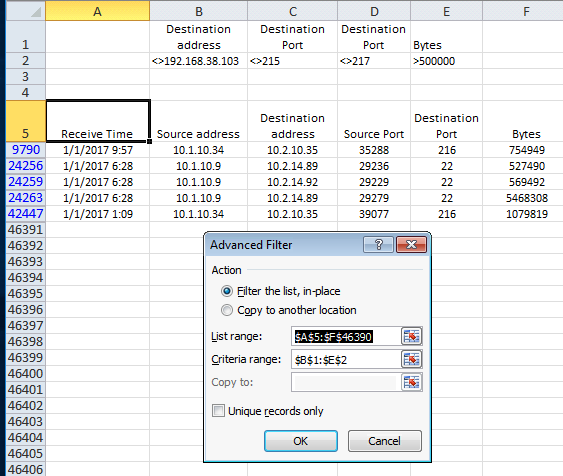
Filtering systematically through a lot of data you may need to slowly exclude rows one by one based on your findings or root cause process. I used advanced filters to accomplish this.

Examples here:
https://support.office.com/en-us/article/Filter-by-using-advanced-criteria-4c9222fe-8529-4cd7-a898-3f16abdff32b#bmexample5

After applying a filter with:

  • excluding 192.168.38.103 and
  • excluding Destination Ports 215 and 217 and
  • showing only rows with bytes > 500 000

Use Data -> Advanced Filter and Select the correct ranges


Comments Off on Excel Advanced Filter
comments

Dec 28

Solaris lp printer queue job ids

If you have a Unix queue name that is long, your job id's may be cut off in the list. So you will be trying to troubleshoot/cancel jobs with "not-found" messages.

lpstat output. Note all job id’s cut off…

printer company_check_M402n now printing company_check_M402n-19101. enabled since Wed Dec 28 05:54:55 2016. available.
[..]
company_check_M402n-191 ebsuser_a         1165   Dec 27 15:36

Correct job id’s shown with a short script. Script below is self explanatory:

~/scripts# python check_spool.py 
Listing LP spool job id's
company_check_M402n-19104

# cat check_spool.py 
from os import listdir,path
from os.path import isfile, join
print "Listing LP spool job id's"
spoolpath='/var/spool/lp/requests/localhost/'
onlyfiles = [f for f in listdir(spoolpath) if isfile(join(spoolpath, f))]
for f in onlyfiles:
  fname = path.abspath(spoolpath + f)
  with open(fname) as spoolfile:
    lines = spoolfile.readlines()
    print lines[0].strip()

Comments Off on Solaris lp printer queue job ids
comments

Dec 23

PAC Manager Login Issue

I had auto username / password login issues and suspect it was because of a long /etc/issue warning during logon.

This worked for me:

Edit Connection -> SSH Options -> Advanced Options -> Add
Right Click Option to List and Select LogLevel
Give it QUIET as a Value and Save and Close

Also see post on selection issue:

PAC Manager Double Click Selection

Comments Off on PAC Manager Login Issue
comments

Dec 21

Solaris SFTP Containment Multiple Nodes

Previous post explaining SFTP containment: http://blog.ls-al.com/sftp-containment-solaris-10/

That solution does not work in a clustered environment. Since then I did also play with loop back (LOFS in Solaris) mounts to a NFS folder. That also works but it had issues being in the vfstab at boot time.

Below is my final solution:
- Since i am trying to avoid number of mounts I also used autofs in this case.
- Create a NFS share INTERFACES so we can share across multiple nodes.
- In order to not add more mounts I did this with autofs. If that does not work on bootup we can can just make a permanent /etc/vfstab mount.
- In our case the application use the following logical path so we need a soft link to our containment area. Soft link svcaccxfr -> /opt/interfaces/svcaccxfr/ in application tree.

Make direct automount
# grep direct /etc/auto_master
/- auto_direct -ro
# cat /etc/auto_direct
/opt/interfaces -rw,vers=3 10.2.13.35:/export/INTERFACES

# svcadm refresh autofs
# svcadm restart autofs

Ensure match in sshd correct folder
# tail -10 /etc/ssh/sshd_config
Match User svcxfr
ChrootDirectory /opt/interfaces/svcxfr
AllowTCPForwarding no
X11Forwarding no
ForceCommand internal-sftp -u 017 -l info

Folders and permissions
# cd /opt
# ls -l | grep interfaces
drwxr-xr-x 3 root root 3 Dec 21 14:12 interfaces
# cd interfaces/
# ls -l | grep svcxfr
drwxr-xr-x 3 root root 3 Dec 21 14:13 svcxfr
# ls -l | grep svcxfr/uploads
# cd svcxfr/
# ls -l | grep uploads
drwxrwxr-x 2 ebsppe_a ebsppe 3 Dec 21 14:50 uploads

Check soft link
# cd /apps/ebs11i/appltop/xxnp/11.5.0/interfaces
# ls -l | grep interfaces
lrwxrwxrwx 1 root root 26 Dec 21 14:14 svcxfr -> /opt/interfaces/svcxfr/

Test client
$ sftp svcxfr@server1
Password:
Connected to server1.
sftp> dir
uploads
sftp> cd uploads
sftp> put zfsrest_test1.py
Uploading zfsrest_test1.py to /uploads/zfsrest_test1.py
zfsrest_test1.py 100% 1934 1.9KB/s 00:00
sftp> exit

Can check sftp issues here.

For example sftp containment does not work if root does not own top levels.
# tail -f /var/log/authlog
Dec 21 14:49:48 server1 sshd[12790]: [ID 800047 auth.info] Accepted keyboard-interactive for svcxfr from 192.168.38.104 port 39788 ssh2
Dec 21 14:49:49 server1 sshd[12790]: [ID 800047 auth.info] subsystem request for sftp
Dec 21 14:50:04 server1 sshd[12790]: [ID 800047 auth.info] Received disconnect from 192.168.38.104: 11: disconnected by user

Comments Off on Solaris SFTP Containment Multiple Nodes
comments

Dec 10

WordPress updates nginx and php-fm

I recently changed to php7 and some time later I realized updates is not working. Prompts for ftp permissions. This fixed it for me.

# diff /etc/php-fpm-7.0.d/www.conf /tmp/www.conf 
24c24
< user = nginx
---
> user = apache
26c26
< group = nginx
---
> group = apache

# service php-fpm restart
Stopping php-fpm-7.0:                                      [  OK  ]
Starting php-fpm-7.0:                                      [  OK  ]

Probably don't need below if above is correct.

# tail -1 /sites1/blog/web/wp-config.php
define('FS_METHOD', 'direct');

Comments Off on WordPress updates nginx and php-fm
comments