Mar 27

Solaris DLMP Test VLAN

As usual use at own risk!

This may not apply to many people but I have an instance where we use DLMP which I really like. However one weakness I have in my environment if someone screw up a VLAN port configuration on a switch you may have serious networking issues and not understand what is happening. DLMP is not going to disable a port in an aggregation because there is link and it does not know if VLAN's are set or not. So I wrote a quick script I may play with more later to improve but this already helps with speeding up testing. Time is something you may not have a lot of when you have intermittent and very odd network behavior.

And of course you will need to take these ports you want to test out of the aggregation for testing and add back in if you need to.

Let me know if anyone find a better way for example DLMP built-in test or testing at a lower level in the networking model etc.

# cat check_vlans.py 
#!/usr/bin/python
import subprocess,re,sys

vlans={}
vlans[1915] = {'IP': '10.2.12.230/24', 'name': 'DR'}
vlans[1953] = {'IP': '10.2.13.230/24', 'name': 'PPE'}
vlans[1954] = {'IP': '10.2.16.230/23', 'name': 'TST'}
vlans[1912] = {'IP': '10.2.14.230/23', 'name': 'DEV'}
vlans[1913] = {'IP': '10.2.10.230/24', 'name': 'MGMT'}

def get_aggr_nets():
  ls_lines = subprocess.Popen(['dladm', 'show-link','xgaggr1'], stdout=subprocess.PIPE).communicate()[0].splitlines()
  line = re.sub(' +',' ',ls_lines[1])
  props = line.split(' ')
  print "LINK: {} CLASS: {} MTU: {} STATE: {} NETS: ".format(props[0],props[1],props[2],props[3]),
  print props[4:]

def vlan_test(nets):
  for net in nets:
      result = subprocess.Popen(['dladm', 'create-vlan','-l',str(net),'-v','1912','vlan1'], stdout=subprocess.PIPE).communicate()[0].splitlines()

      for i,v in vlans.iteritems() :
        print "Testing interface: {} over vlan id: {} {} using IP: {} Result: ".format(net,i,v['name'],v['IP']),

        result = subprocess.Popen(['dladm', 'modify-vlan','-v',str(i),'vlan1'], stdout=subprocess.PIPE).communicate()[0].splitlines()

        result = subprocess.Popen(['ipadm', 'create-ip','vlan1'], stdout=subprocess.PIPE).communicate()[0].splitlines()

        result = subprocess.Popen(['ipadm', 'create-addr','-T','static','-a',v['IP'],'vlan1/v4'], stdout=subprocess.PIPE).communicate()[0].splitlines()

        subnet=v['IP'].split('.')
        gateway='10.2.' + str(subnet[2]) + '.1'

        #result = subprocess.Popen(['ping', '-i','vlan1',gateway], stdout=subprocess.PIPE).communicate()[0].splitlines()
        result = subprocess.Popen(['ping', '-i','vlan1',gateway,'57','1'], stdout=subprocess.PIPE).communicate()[0].splitlines()
        print result

        result = subprocess.Popen(['ipadm', 'delete-ip','vlan1'], stdout=subprocess.PIPE).communicate()[0].splitlines()

      result = subprocess.Popen(['dladm', 'delete-vlan','vlan1'], stdout=subprocess.PIPE).communicate()[0].splitlines()

print "\n\nShow nets in xgaggr1:"
get_aggr_nets()
print "\n\nTesting net: " + sys.argv[1]
test_nets = [sys.argv[1]]
print test_nets
vlan_test(test_nets)

Example run.

root@usli-psvm-ld01 # python check_vlans.py net3

Show nets in xgaggr1:
LINK: xgaggr1 CLASS: aggr MTU: 1500 STATE: up NETS:  ['net1']

Testing net: net3
['net3']
Testing interface: net3 over vlan id: 1912 DEV using IP: 10.2.14.230/23 Result:  ['no answer from 10.2.14.1']
Testing interface: net3 over vlan id: 1953 PPE using IP: 10.2.13.230/24 Result:  ['no answer from 10.2.13.1']
Testing interface: net3 over vlan id: 1954 TST using IP: 10.2.16.230/23 Result:  ['no answer from 10.2.16.1']
Testing interface: net3 over vlan id: 1915 DR using IP: 10.2.12.230/24 Result:  ['no answer from 10.2.12.1']
Testing interface: net3 over vlan id: 1913 MGMT using IP: 10.2.10.230/24 Result:  ['no answer from 10.2.10.1']
root@usli-psvm-ld01 # python check_vlans.py net0

Show nets in xgaggr1:
LINK: xgaggr1 CLASS: aggr MTU: 1500 STATE: up NETS:  ['net1']

Testing net: net0
['net0']
Testing interface: net0 over vlan id: 1912 DEV using IP: 10.2.14.230/23 Result:  ['10.2.14.1 is alive']
Testing interface: net0 over vlan id: 1953 PPE using IP: 10.2.13.230/24 Result:  ['10.2.13.1 is alive']
Testing interface: net0 over vlan id: 1954 TST using IP: 10.2.16.230/23 Result:  ['10.2.16.1 is alive']
Testing interface: net0 over vlan id: 1915 DR using IP: 10.2.12.230/24 Result:  ['10.2.12.1 is alive']
Testing interface: net0 over vlan id: 1913 MGMT using IP: 10.2.10.230/24 Result:  ['10.2.10.1 is alive']

Comments Off on Solaris DLMP Test VLAN
comments

Mar 05

Unify gateway DHCP domain name for DNS settings

Quick notes on how I manually added a domain name to my Unify gateway DHCP server.

$ cat 20170304-unify_GW_DHCP_set_domain
 
$ ssh admin@192.168.1.1
Welcome to EdgeOS

By logging in, accessing, or using the Ubiquiti product, you
acknowledge that you have read and understood the Ubiquiti
License Agreement (available in the Web UI at, by default,
http://192.168.1.1) and agree to be bound by its terms.

admin@192.168.1.1's password: 
Linux myGW 3.10.20-UBNT #1 SMP Tue Nov 1 17:17:25 PDT 2016 mips64
Welcome to EdgeOS
admin@myGW:~$ info

Model:       UniFi-Gateway-3
Version:     4.3.33.4936086
MAC Address: xx:xx:xx:xx:xx:xx
IP Address:  x.x.x.x
Hostname:    myGW
Uptime:      5881438 seconds

Status:      Connected (http://mynetcontroller.mydomain.com:8080/inform)

admin@myGW:~$ configure 
[edit]
[edit]
admin@myGW# show service dhcp-server 
 disabled false
 hostfile-update enable
 shared-network-name LAN_192.168.1.0-24 {
     authoritative enable
     description vlan1
     subnet 192.168.1.0/24 {
         default-router 192.168.1.1
         dns-server 192.168.1.1
         lease 86400
         start 192.168.1.6 {
             stop 192.168.1.50
         }
     }
 }
[edit]
admin@myGW# edit service dhcp-server shared-network-name LAN_192.168.1.0-24
[edit service dhcp-server shared-network-name LAN_192.168.1.0-24]
admin@myGW# edit subnet 192.168.1.0/24
[edit service dhcp-server shared-network-name LAN_192.168.1.0-24 subnet 192.168.1.0/24]
admin@myGW# set domain-name localdomain
[edit service dhcp-server shared-network-name LAN_192.168.1.0-24 subnet 192.168.1.0/24]
admin@myGW# top
[edit]
admin@myGW# commit
[ service dhcp-server ]
Stopping DHCP server daemon...
Starting DHCP server daemon...

Comments Off on Unify gateway DHCP domain name for DNS settings
comments

Mar 05

Windows Host Lookup Only work with nslookup

I have struggled with a couple Windows clients and using a DHCP/DNS lookups. Basically I want to use machines(physicals/VM's) on my home network by accessing by their names. Since they all register correctly in the DHCP/DNS device I use I should be able to always use their names which reflect last IP address for it. The goal of course is not to run any additional DHCP or DNS services on my home network. Or result to DYnamic DNS services for each client on my home network. I tend to have a lot of VM's.

In this case I am using a Unify gateway from Ubiquity Networks and it works well. In addition serving DHCP from it does serve me my local DNS for my home network. This works well from Linux but from Windows it does not. In short Windows can find the client name when I use nslookup. But ping(or any other lookup like RDP etc) fails. I tried several things including:
1. Setup Windows client DNS/hostname/IP settings/search domain/registration like it should be.
2. Some googling suggested registry changes and a few other suggestions nothing helpful.
3. Add a domain name to Unify gateway DHCP configuration.

Nothing worked including referencing the client by FQDN. However although not ideal Windows actually does find the client name if you simply add a dot at the end of the short name. For example ping VM1. instead of ping VM1 or ping VM1.localdomain and so forth.

For me this works and I am not going to try and understand what is braindead in name resolution in Windows I can just dda a dot at the end of short names for my use cases.

Comments Off on Windows Host Lookup Only work with nslookup
comments

Feb 26

Oracle VM SDK Create VM

I am playing with the java SOAP API to test creating a VM and since it took me a while to get it working I am jotting down my recipe for future refining. This is rough and needs a rewrite. Currently it is just a gutted version of the Sample that comes with the OVMM ISO.

Note I ran this on the OVMM server at first and using localhost for connecting. That worked but to run this code from a different server I copied java from the OVMM server. Newer java just gave me too much SSL issues.

Also I would prefer using REST/JSON but that is not working yet. REST/JSON gave me a NullPointerException which may provide me a clue as to why I could not get POST to work from my Python tests in a prior article. Which is actually the reason I am testing the Java code.

You are WARNED this code is rough. For example it will create duplicate VM's with the same name. Also checkign the SERverPool is not safe it needs more logic. It will just grab the last one if you have more than one.

You will need jersey for this code to work. Also as I mentioned this needs a lot of cleanup. I had some dependency issues so I copied a lot of classes from the SDK into my tree $APPROOT/lib/com/oracle/ovm/mgr/ws/

rrosso@BL:~/src/ovm_java_api$ ls lib/
com  jersey-bundle-1.19.1.jar  OvmWsClient.jar

Little BASH script to show compile and run.

 
rrosso@BL:~/src/ovm_java_api$ cat buildrun.sh 
# Script to build and run OVM 3.3.3 specifc SDK API
# Run with two parms example: ./buildrun.sh vmname=vm1 server=ovs333
# JAVA ENV
#export JAVA_HOME=/home/rrosso/jdk1.8.0_121
export JAVA_HOME=/home/rrosso/java
export PATH=$JAVA_HOME/bin:/usr/lib64/qt-3.3/bin:/usr/local/bin:/bin:/usr/bin:/usr/local/sbin:/usr/sbin:/sbin:/home/rrosso/bin
#java -version

APPROOT=/home/rrosso/src/ovm_java_api
BUILDROOT=com/oracle/ovm/mgr/ws/sample/
OVMLIB=$APPROOT/lib

# APP ROOT
cd $APPROOT

# BUILD
cd $BUILDROOT
rm WsDevClient*.class
javac -cp $OVMLIB/OvmWsClient.jar:. WsDevClient.java

# RUN
cd $APPROOT
#java -Djavax.net.debug=ssl -cp .:$OVMLIB com.oracle.ovm.mgr.ws.sample.WsDevClient
#echo "Trying to create $1 on $2"
java -cp .:$OVMLIB com.oracle.ovm.mgr.ws.sample.WsDevClient $1 $2

Example run working:

rrosso@BL:~/src/ovm_java_api$ ./buildrun.sh vmname=vm4.3 server=ovs333
Starting Ovm Api Test Using SOAP Implementation

Starting VM create of: vm4.3
create vm job id: Create Vm: vm4.3 on Server Pool: pool1(1487049718384) Uri: https://localhost:7002/ovm/core/wsapi/rest/Job/1487049718384

Client Source:

rrosso@BL:~/src/ovm_java_api$ cat com/oracle/ovm/mgr/ws/sample/WsDevClient.java
package com.oracle.ovm.mgr.ws.sample;
import java.security.SecureRandom;
import java.security.cert.CertificateException;
import java.security.cert.X509Certificate;
import java.util.List;
import java.util.Locale;
import java.util.MissingResourceException;
import java.util.ResourceBundle;
import javax.net.ssl.HostnameVerifier;
import javax.net.ssl.HttpsURLConnection;
import javax.net.ssl.KeyManager;
import javax.net.ssl.SSLContext;
import javax.net.ssl.SSLSession;
import javax.net.ssl.TrustManager;
import javax.net.ssl.X509TrustManager;
import com.oracle.ovm.mgr.ws.client.OvmWsClient;
import com.oracle.ovm.mgr.ws.client.OvmWsClientFactory;
import com.oracle.ovm.mgr.ws.model.BaseObject;
import com.oracle.ovm.mgr.ws.model.Id;
import com.oracle.ovm.mgr.ws.model.Job;
import com.oracle.ovm.mgr.ws.model.Job.JobRunState;
import com.oracle.ovm.mgr.ws.model.JobError;
import com.oracle.ovm.mgr.ws.model.Repository;
import com.oracle.ovm.mgr.ws.model.Server;
import com.oracle.ovm.mgr.ws.model.ServerPool;
//import com.oracle.ovm.mgr.ws.model.StorageElement;
import com.oracle.ovm.mgr.ws.model.Vm;
import com.oracle.ovm.mgr.ws.model.Vm.VmDomainType;
import com.oracle.ovm.mgr.ws.model.VmDiskMapping;
import com.oracle.ovm.mgr.ws.model.WsException;

/**
 * A simple web services create vm client.
 * .
 * BEFORE RUNNING THIS you should first override the WsDevClient_<username>.properties file with your own values. See that
 * file for details.
 */
public class WsDevClient
{
    private OvmWsClient                api;
    private Id<Vm>                     testVmId;
    private Id<ServerPool>             testPoolId;
    private Id<Server>                 testServerId;
    private Id<Repository>             testRepoId;
    private Id<Vm>                     importedAssemblyVmId;
    private Job                        repoPresentJob;

    public static void main(final String args[])
    {
        int index;
	String vmname="";
	String server="";
        for (index = 0; index < args.length; ++index)
        {
            //System.out.println("args[" + index + "]: " + args[index]);
       	    String[] splitted=args[index].split("=");
	    if ( splitted[0].equals("vmname") ) {
	      vmname=splitted[1];
              //System.out.println(vmname);
	
	    }
	    if ( splitted[0].equals("server") ) {
	      server=splitted[1];
              //System.out.println(server);
	    }
        }
       //String[] vmname=args[0].split("=");;
       //String[] server=args[1].split("=");;
        final WsDevClient wsClient = new WsDevClient();
       wsClient.run(vmname,server);
    }

    public void run(final String testVmName,final String testServerName)
    {
        try
        {
            // Configure the SSLContext with an insecure TrustManager
            // This is done to avoid the need to use valid certificates in the development environment.
            // This should not be done in a real / secure environment.
            final SSLContext ctx = SSLContext.getInstance("TLS");
            ctx.init(new KeyManager[0], new TrustManager[]
            {
                new InsecureTrustManager()
            }, new SecureRandom());
            SSLContext.setDefault(ctx);

            // Configure the HostnameVerifier to trust host names that do
            // not match the name on the server certificate.
            // This should not be done in real / secure environments.
            final HostnameVerifier hv = new HostnameVerifier()
            {
                public boolean verify(final String arg0, final SSLSession arg1)
                {
                    return true;
                }
            };
            HttpsURLConnection.setDefaultHostnameVerifier(hv);

            final ResourceBundle rootProps = ResourceBundle.getBundle("com.oracle.ovm.mgr.ws.sample.WsDevClient");
            ResourceBundle userProps = null;
            try
            {
                userProps = ResourceBundle.getBundle("com.oracle.ovm.mgr.ws.sample.WsDevClient_" + System.getProperty("user.name"));
            }
            catch (final MissingResourceException ex)
            {
                System.out.println(ex);
                System.out.println("Warning: No user-overridden properties found.  Using default values.  This is unlikely to work and is not recommended!");
            }
            // Load the properties. An exception will be thrown if any of these properties are not found.
            final String wsimpl = getProperty("wsimpl", rootProps, userProps);
            final String dialect = getProperty("dialect", rootProps, userProps);
            final String hostname = getProperty("hostname", rootProps, userProps);
            final String port = getProperty("port", rootProps, userProps);
            final String username = getProperty("username", rootProps, userProps);
            final String password = getProperty("password", rootProps, userProps);
            final String testRepo = getProperty("testRepo", rootProps, userProps);
            //final String testVmName = getProperty("testVmName", rootProps, userProps);
            final String debugStr = getProperty("debugHttpTraffic", rootProps, userProps);
            //final String testServerName = getProperty("testServerName", rootProps, userProps);
            final String testServerPoolName = getProperty("testServerPoolName", rootProps, userProps);
            final String assemblyUrl = getProperty("assemblyUrl", rootProps, userProps);
            final boolean debug = debugStr.equalsIgnoreCase("true");

            api = OvmWsClientFactory.getOvmWsClient(wsimpl);
            api.setDebug(debug);
            api.setDialect(dialect);
            api.initialize(hostname, port, true);
            // Authenticate with the OvmApi Service
            api.login(username, password, Locale.getDefault());
            System.out.println("Starting Ovm Api Test Using " + wsimpl + " Implementation\n");
	    final List<Repository> repos = api.repositoryGetAll();
            for (final Repository repo : repos)
            {
                //printRepository(repo);

                if (repo.getId().getValue().equals(testRepo))
                {
                    testRepoId = repo.getId();
                }
            }
	    // Get a list of all Server Pools
            final List<Id<ServerPool>> serverPoolIds = api.serverPoolGetIds();
            for (final Id<ServerPool> serverPoolId : serverPoolIds)
            {
                //printId("ServerPool", serverPoolId);
		// need better checking than just picking one
		testPoolId = serverPoolId;
            }
            // Run checks to make sure we can proceed.
            if (testRepoId == null)
            {
                throw new Exception("Repository for VM creation (with id " + testRepo + ") not found.  Exiting.");
            }
            System.out.println("Starting VM create of: " + testVmName);
            Vm testVm = new Vm();
            testVm.setVmDomainType(VmDomainType.XEN_HVM);
            testVm.setName(testVmName);
            testVm.setRepositoryId(testRepoId);
	    //final ServerPool serverPool = api.serverPoolGetById(testPoolId);
            final Job vmCreateJob = api.vmCreate(testVm, testPoolId);
            System.out.println("create vm job id: " + vmCreateJob.getId());
            testVmId = waitForJobComplete(api, vmCreateJob, Vm.class);
            // fetch vm create result object to fully populate the object (including the id and default values)
            // in preparation for the modify test
            testVm = api.vmGetById(testVmId);
        }
        catch (final Exception e)
        {
            e.printStackTrace();
            System.out.println("\nException occurred during processing.  Calling cleanup routine.");
        }
        finally
        {
                try
                {
                    api.logout();
                }
                catch (final WsException e)
                {
                    e.printStackTrace();
                }
        }
    }
    /**
     * @param string
     * @param rootProps
     * @param userProps
     * @return
     */
    private String getProperty(final String key, final ResourceBundle... bundles)
    {
        String value = null;
        MissingResourceException missingResourceEx = null;
        for (final ResourceBundle bundle : bundles)
        {
            if (bundle != null)
            {
                try
                {
                    value = bundle.getString(key);
                }
                catch (final MissingResourceException ex)
                {
                    missingResourceEx = ex;
                }
            }
        }
        if (value == null)
        {
            throw missingResourceEx;
        }
        return value;
    }
    /**
     * @param group
     */
    private void printJob(final Job job)
    {
        System.out.println("Job Id: " + job.getId());
        System.out.println("\tUser: " + job.getUser());
        System.out.println("\tStart Time: " + job.getStartTime());
        System.out.println("\tEnd Time: " + job.getEndTime());
        System.out.println("\tRun State: " + job.getJobRunState());
        System.out.println("\tGroup: " + job.isJobGroup());
        System.out.println("\tResult Id: " + job.getResultId());
        try
        {
            final String transcript = api.jobGetDebugTranscript(job.getId());
            System.out.println(transcript);
        }
        catch (final Exception e)
        {
            e.printStackTrace();
        }
        final List<Id<Job>> jobChildren = job.getChildJobIds();
        if (jobChildren != null)
        {
            for (final Id<Job> childJob : jobChildren)
            {
                System.out.println("\tChildJob: " + childJob);
            }
        }
        final JobError error = job.getError();
        if (error != null)
        {
            System.out.println("\tError Type: " + error.getType());
            System.out.println("\tError Message: " + error.getMessage());
        }

        System.out.println();
    }
    public void waitForJobComplete(final OvmWsClient api, final Job job) throws WsException
    {
        waitForJobComplete(api, job, null);
    }
    @SuppressWarnings("unchecked")
    public <T> Id<T> waitForJobComplete(final OvmWsClient api, Job job, final Class<T> type) throws WsException
    {
        while (job.isSummaryDone() == false)
        {
            try
            {
                Thread.sleep(1000);
            }
            catch (final Exception e)
            {
            }

            job = api.jobGetById(job.getId());

            if (job.getJobRunState().equals(JobRunState.FAILURE))
            {
                final JobError error = job.getError();
                if (error != null)
                {
                    System.out.println("    error type: " + error.getType());
                    System.out.println("    error message: " + error.getMessage());
                }
                System.out.println("    transcript: " + api.jobGetDebugTranscript(job.getId()));
            }
        }
        @SuppressWarnings("rawtypes")
        final Id resultId = job.getResultId();
        if (type == null)
        {
            return resultId;
        }
        else
        {
            final Id<T> typedResultId = resultId;
            return typedResultId;
        }
    }
    private static class InsecureTrustManager implements X509TrustManager
    {
        @Override
        public void checkClientTrusted(final X509Certificate[] arg0, final String arg1) throws CertificateException
        {
        }
        @Override
        public void checkServerTrusted(final X509Certificate[] arg0, final String arg1) throws CertificateException
        {
        }
        @Override
        public X509Certificate[] getAcceptedIssuers()
        {
            return null;
        }
    }
}

Properties file. I will work more of this into command line parms later.

rrosso@BL:~/src/ovm_java_api$ cat com//oracle/ovm/mgr/ws/sample/WsDevClient_rrosso.properties 
wsimpl=SOAP
dialect=XML
hostname=192.168.1.231
port=7002
username=admin
password=myAdminPassW
testRepo=0004fb00000300002e4e288cfa06e535
testServerPoolName=repo1
debugHttpTraffic=false
assemblyUrl=http://install-vi.us.oracle.com/tests/assemblies/virtual-appliance-simple/package.ovf
Comments Off on Oracle VM SDK Create VM
comments

Feb 21

Linux Kerberos Auhtentication

I am jotting down my recipe for RedHat 7.3 Linux and providing user logins from Microsoft's Active Directory. This was tested with two AWS instances and Microsoft AD 2016. There are many articles around the Interwebs but in short things became a lot easier with SSSD in most major distributions.

Out of scope:
- Add AD role to Windows 2016 server
- Add DNS entry and reverse entry for client
- Make sure DNS and reverse DNS works!

# more /etc/redhat-release 
Red Hat Enterprise Linux Server release 7.3 (Maipo)

# domainname
(none)

# hostname
ip-172-31-22-140.ec2.internal

# cat /etc/hosts
127.0.0.1   localhost localhost.localdomain localhost4 localhost4.localdomain4
::1         localhost localhost.localdomain localhost6 localhost6.localdomain6
172.31.22.140 ip-172-31-22-140.ec2.internal 
172.31.16.163 ec2amaz-82floju.iqonda.com ec2amaz-82floju

Install packages.

# yum install realmd sssd adcli

Ensure you are pointing to the AD/DNS server for name resolution. I made sure resolv.conf can't be updated on boot since this is a dynamic EC2 instance.

 
# cat /etc/resolv.conf 
search iqonda.com
nameserver 172.31.16.163

# chattr +i /etc/resolv.conf

# ping 172.31.16.163
PING 172.31.16.163 (172.31.16.163) 56(84) bytes of data.
64 bytes from 172.31.16.163: icmp_seq=37 ttl=128 time=0.653 ms
64 bytes from 172.31.16.163: icmp_seq=38 ttl=128 time=0.522 ms
^C
--- 172.31.16.163 ping statistics ---
38 packets transmitted, 2 received, 94% packet loss, time 36999ms
rtt min/avg/max/mdev = 0.522/0.587/0.653/0.069 ms

# nslookup 172.31.16.163
Server:		172.31.16.163
Address:	172.31.16.163#53

Non-authoritative answer:
163.16.31.172.in-addr.arpa	name = ip-172-31-16-163.ec2.internal.

Authoritative answers can be found from:

# hostname
ip-172-31-22-140.ec2.internal

# nslookup ip-172-31-22-140.ec2.internal
Server:		172.31.16.163
Address:	172.31.16.163#53

Non-authoritative answer:
Name:	ip-172-31-22-140.ec2.internal
Address: 172.31.22.140

# nslookup 172.31.22.140
Server:		172.31.16.163
Address:	172.31.16.163#53

140.22.31.172.in-addr.arpa	name = ip-172-31-22-140.ec2.internal.iqonda.com.

# nslookup iqonda.com
Server:		172.31.16.163
Address:	172.31.16.163#53

Name:	iqonda.com
Address: 172.31.16.163

# dig -t SRV _ldap._tcp.ad.iqonda.com @172.31.16.163

; <<>> DiG 9.9.4-RedHat-9.9.4-38.el7_3.2 <<>> -t SRV _ldap._tcp.ad.iqonda.com @172.31.16.163
;; global options: +cmd
;; Got answer:
;; ->>HEADER<<- opcode: QUERY, status: NXDOMAIN, id: 51524
;; flags: qr aa rd ra; QUERY: 1, ANSWER: 0, AUTHORITY: 1, ADDITIONAL: 1

;; OPT PSEUDOSECTION:
; EDNS: version: 0, flags:; udp: 4000
;; QUESTION SECTION:
;_ldap._tcp.ad.iqonda.com.	IN	SRV

;; AUTHORITY SECTION:
iqonda.com.		3600	IN	SOA	ec2amaz-82floju.iqonda.com. hostmaster.iqonda.com. 95 900 600 86400 3600

;; Query time: 0 msec
;; SERVER: 172.31.16.163#53(172.31.16.163)
;; WHEN: Tue Feb 21 13:02:58 EST 2017
;; MSG SIZE  rcvd: 126

Now lets check if we can join the AD domain.

# realm discover
realm: No default realm discovered

# realm discover ec2amaz-82floju
iqonda.com
  type: kerberos
  realm-name: IQONDA.COM
  domain-name: iqonda.com
  configured: no
  server-software: active-directory
  client-software: sssd
  required-package: oddjob
  required-package: oddjob-mkhomedir
  required-package: sssd
  required-package: adcli
  required-package: samba-common-tools

# realm join ec2amaz-82floju
Password for Administrator: 

# realm list
iqonda.com
  type: kerberos
  realm-name: IQONDA.COM
  domain-name: iqonda.com
  configured: kerberos-member
  server-software: active-directory
  client-software: sssd
  required-package: oddjob
  required-package: oddjob-mkhomedir
  required-package: sssd
  required-package: adcli
  required-package: samba-common-tools
  login-formats: %U@iqonda.com
  login-policy: allow-realm-logins

Add login permission to a specific AD group.

# realm permit -g webadmins@iqonda.com

Test a client login.

$ ssh -l user1@iqonda.com ec2-107-21-198-224.compute-1.amazonaws.com
Permission denied (publickey,gssapi-keyex,gssapi-with-mic).

Allow SSHD passwords.

# grep PasswordA /etc/ssh/sshd_config 
PasswordAuthentication yes
# systemctl restart sshd

Try client login again. And test sudo as well.

$ ssh -l user1@iqonda.com ec2-107-21-198-224.compute-1.amazonaws.com
user1@iqonda.com@ec2-107-21-198-224.compute-1.amazonaws.com's password: 
Creating home directory for user1@iqonda.com.

$ id
uid=234601107(user1@iqonda.com) gid=234600513(domain users@iqonda.com) groups=234600513(domain users@iqonda.com),234601104(webadmins@iqonda.com) context=unconfined_u:unconfined_r:unconfined_t:s0-s0:c0.c1023

$ pwd
/home/user1@iqonda.com

$ sudo systemctl status sshd

We trust you have received the usual lecture from the local System
Administrator. It usually boils down to these three things:

    #1) Respect the privacy of others.
    #2) Think before you type.
    #3) With great power comes great responsibility.

[sudo] password for user1@iqonda.com: 
user1@iqonda.com is not in the sudoers file.  This incident will be reported.

Allow AD group sudo perms.

# tail -2 //etc/sudoers
%webadmins@iqonda.com ALL=(ALL) ALL
#%Domain\ Admins@example.com ALL=(ALL:ALL) ALL  

$ sudo systemctl status sshd
[sudo] password for user1@iqonda.com: 
● sshd.service - OpenSSH server daemon
   Loaded: loaded (/usr/lib/systemd/system/sshd.service; enabled; vendor preset: enabled)
[..]
# systemctl status sssd
● sssd.service - System Security Services Daemon
   Loaded: loaded (/usr/lib/systemd/system/sssd.service; enabled; vendor preset: disabled)
  Drop-In: /etc/systemd/system/sssd.service.d
           └─journal.conf
   Active: active (running) since Tue 2017-02-21 13:05:42 EST; 3min 46s ago
  Process: 2276 ExecStart=/usr/sbin/sssd -D -f (code=exited, status=0/SUCCESS)
 Main PID: 2277 (sssd)
   CGroup: /system.slice/sssd.service
           ├─2277 /usr/sbin/sssd -D -f
           ├─2278 /usr/libexec/sssd/sssd_be --domain iqonda.com --uid 0 --gid 0 --debug-to-files
           ├─2279 /usr/libexec/sssd/sssd_nss --uid 0 --gid 0 --debug-to-files
           └─2280 /usr/libexec/sssd/sssd_pam --uid 0 --gid 0 --debug-to-files

Feb 21 13:05:42 ip-172-31-22-140.ec2.internal sssd[nss][2279]: Starting up
Feb 21 13:05:42 ip-172-31-22-140.ec2.internal systemd[1]: Started System Security Services Daemon.
Feb 21 13:05:42 ip-172-31-22-140.ec2.internal sssd_be[2278]: GSSAPI client step 1
Feb 21 13:05:42 ip-172-31-22-140.ec2.internal sssd_be[2278]: GSSAPI client step 2
Feb 21 13:07:58 ip-172-31-22-140.ec2.internal sssd_be[2278]: GSSAPI client step 1
Feb 21 13:07:58 ip-172-31-22-140.ec2.internal sssd_be[2278]: GSSAPI client step 2
[/bash


For reference sssd config created automatically by realm join.

[bash]
# cat /etc/sssd/sssd.conf 

[sssd]
domains = iqonda.com
config_file_version = 2
services = nss, pam

[domain/iqonda.com]
ad_server = ec2amaz-82floju
ad_domain = iqonda.com
krb5_realm = IQONDA.COM
realmd_tags = manages-system joined-with-adcli 
cache_credentials = True
id_provider = ad
krb5_store_password_if_offline = True
default_shell = /bin/bash
ldap_sasl_authid = IP-172-31-22-14$
ldap_id_mapping = True
use_fully_qualified_names = True
fallback_homedir = /home/%u@%d
access_provider = simple
simple_allow_groups = webadmins@iqonda.com

Comments Off on Linux Kerberos Auhtentication
comments

Feb 19

SSH password manager

I have recently started using a distro called BunsenLabs which is a Debian/Openbox flavor. I run Linux inside VirtualBox and so far I really like this distro.  I have previously written about using Linux SSH connection managers like PAC(Perl Auto Connect), GCM, Remmina etc.  I have mostly settled on PAC for most Linux installations but it has a couple irritations and seem to be getting pretty old.  My goals is mostly to keep track of sometimes hundreds of machine names/usernames/passwords.  Couple options I have played with is putty from the command line and sshpass.

For putty something like this could probably be built on:

$ putty -load host01 -l root -pw mypass

With sshpass something like this works. Assuming you have sshpass to install on your distro.

$ sshpass -p 'mypass' ssh -o StrictHostKeyChecking=no root@host01
Last login: Sun Feb 19 11:11:45 2017 from 10.140.6.123
[root@HOST01 ~]# 

Since I am using OpenBox here I added a custom OpenBox pipemenu by changing the existing SSH pipemenu a little bit. This works for me but I will probably change it a little bit in future to use a better config file with XML and/or encrypting the details.

Create a config folder and file to save the host details. For now config file is in SSH config format so the existing paramiko.config class can still read it. WARNING nothing about saving passwords like this is secure. You were warned!

$ cat .sshpassdb/config 
Host host01
  HostName host01.localdomain
  User root:mypass

# Test complete command line that we will try in Openbox menus
$ x-terminal-emulator -e sshpass -p 'mypass' ssh -o StrictHostKeyChecking=no root@host01

Now lets add an Openbox pipemenu.

Right click desktop -> Preferences -> Openbox -> GUI Menu Editor
Expand Openbox 3 and add a pipemenu. I called is SSH (sshpass) and pointed it to /home/myuser/scripts/bl-sshpass-pipemenu
I copied cp /usr/bin/bl-sshconfig-pipemenu /home/myuser/scripts/bl-sshpass-pipemenu
Edit new this custom python file now to populate the Openbox custom menu when opened

$ cat scripts/bl-sshpass-pipemenu

#!/usr/bin/env python
#    bl-sshpass-pipemenu - an Openbox pipemenu for Graphics applications
import os
import warnings
with warnings.catch_warnings():
    warnings.simplefilter("ignore")
    from paramiko.config import SSHConfig
import argparse
import sys

ap = argparse.ArgumentParser(description="""Openbox pipemenu to handle secure shell installation and configuration.
The install menu item is only shown when '/usr/sbin/sshd' is not executable. """)
opts = ap.parse_args(sys.argv[1:])

cfgdir = os.getenv("HOME")+"/.sshpassdb"
cfgfile = cfgdir+"/config"

try:
    config_file = file(cfgfile)
except IOError:
    if not os.path.exists(cfgdir):
        os.makedirs(cfgdir, 0700)
    f = open(cfgfile, 'w')
    o = '# SSH config file, \'man ssh_config\' for more details.\n\n'
    o += '#Host example\n'
    o += '#    hostname example.com\n'
    o += '#    user joebloggs\n'
    f.write(o)
    f.close()
    os.chmod(cfgfile, 0600)
    config_file = file(cfgfile)
    config = SSHConfig()
    config.parse(config_file)
    hosts = config._config
else:
    config = SSHConfig()
    config.parse(config_file)
    hosts = config._config

print '<openbox_pipe_menu>\n'

need_separator = False

if len(hosts) >= 2:
    for h in hosts[1:]:
        if 'host' in h and 'hostname' in h['config']:
            conf = h['config']
            user = ''
            if 'user' in conf:
                user = conf['user'].split(':')[0]
                passw = ' -p ' + conf['user'].split(':')[1] + ' '
            port = ['', '']
            if 'port' in conf:
                port[0] = '-p ' + conf['port'] + ' '
                port[1] = ':' + conf['port']
            if need_separator:
                print '<separator/>\n'
                need_separator = False
            print '<menu id="ssh-'+h['host'][0]+'" label="'+h['host'][0]+'">'
            print '    <item label="Start terminal session">'
            print '        <action name="Execute">'
            print '            <command>'
            print '                x-terminal-emulator -e sshpass ' + passw + 'ssh -o StrictHostKeyChecking=no ' + user + '@' + conf['hostname']
            print '            </command>'
            print '        </action>'
            print '    </item>\n'
            print '</menu>\n'
    print '<separator/>\n'

if need_separator:
    print '<separator/>\n'
    need_separator = False

print '</openbox_pipe_menu>'

Test with Right Click on desktop -> Network -> SSH (sshpass) and select a host -> Start terminal session.
Add hosts to config file.

Comments Off on SSH password manager
comments

Feb 15

Cleaning up Outlook archives

Over time I accumulated enormous Outlook data files. Several "archive" PST's that I collected from different time periods and different versions of Outlook. And possibly migrating to new computers. In short you end up with large archive PST’s that you have no idea on time span, duplicates etc.

I do try to manually clean conversations on new email daily but sometimes I don’t get time. So a lot of my Outlook email consist of long threads where really only the latest email have the whole 100 previous email content anyhow. So keeping the latest only makes sense.

In short my goal was to end up with several archives containing only one year worth of email and with no duplicates.  As well as conversations cleaned sufficiently to just keep latest email in the thread.

First I opened all my various archive PST’s in one Outlook setup. Then I used the archive tool to archive into one very large PST.

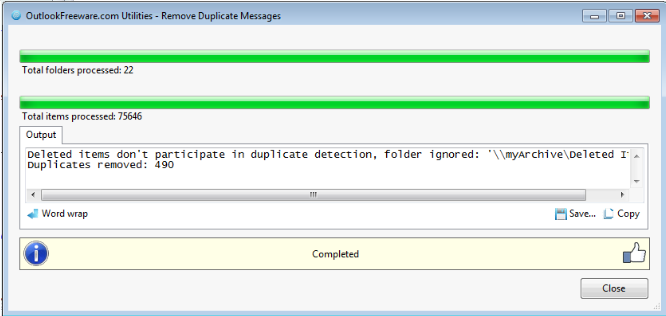
Then used a freeware tool to remove duplicates. It does not do Deleted Items though so had to do some moving around for that.

Then used the Outlook clean conversation feature.

Clean duplicates


Check use custom fields and ran again.


At this point I could use some of the Outlook howtos to clean conversations and remove duplicate items as shown in links below.

Links:

https://support.office.com/en-us/article/Recover-deleted-items-in-Outlook-2010-cd9dfe12-8e8c-4a21-bbbf-4bd103a3f1fe?ui=en-US&rs=en-US&ad=US#bkmk_recoverableitems

https://support.microsoft.com/en-us/help/299349/how-to-remove-duplicate-imported-items-in-outlook

https://support.office.com/en-us/article/Use-Conversation-Clean-Up-to-delete-redundant-messages-70179d54-fa57-48ce-95fd-416d72e5ccd4

http://www.outlookfreeware.com/en/products/all/OutlookMessagesRemoveDuplicates/

Comments Off on Cleaning up Outlook archives
comments

Feb 01

System Administration with Fabric and OVM

I recently tried fabric for a few automation tasks and could use it to interact with the Oracle VM CLI.  I am using the OVM Rest API whenever possible but in some cases this may work for you.  Also I was having issues with the REST API and POST type calls so needed another method.  I have expect also for CLI interaction but fabric is a lot more python like and powerful.

In addition not in this use case with OVM but if you use fabric to run against many hosts you could pretty easily get it to do parallel execution with a bit of python magic. CHeck here for great example: https://dmsimard.com/2013/11/29/capture-output-from-parallel-execution-with-fabric/

Example fabfile:

import os
from fabric.api import *
from fabric.colors import red, green
import re

def getprop(item,tag):
  item = item + ' '
  s=tag + ":(.*?) "
  ovmprop=re.findall(s, item)
  return ovmprop[0]


env.user = os.getenv('SSH_USER', 'admin')
env.password = os.getenv('SSH_PASSWORD', 'Welcome')

# http://docs.oracle.com/cd/E35328_01/E35336/E35336.pdf
def vm_list_raw():
  vms=run('list vm', shell=False)
  print(green(vms))

def vm_create(name):
  run('create Vm name=' + name + ' domainType=XEN_HVM repository=ovs2 on ServerPool name=ovsPool1', shell=False)

def vm_list():
  with settings(hide('running', 'commands', 'stdout', 'stderr')):
    vms=run('list vm', shell=False).split('\n\r')
    #print(green(vms))

    for line in vms:
      if 'id' in line:
        id=getprop(line,'id')
        name=getprop(line,'name')
        print '{:20} {:20}'.format(id,name)  

Examples:

$ fab -H 192.168.1.223:10000 vm_list
[192.168.1.223:10000] Executing task 'vm_list'
0004fb000006000048e25da9faac0ac6 VM1                 

Done.
Disconnecting from 192.168.1.223:10000... done.

$ fab -H 192.168.1.223:10000 vm_create:"name=VM6"
[192.168.1.223:10000] Executing task 'vm_create'
[192.168.1.223:10000] run: create Vm name=VM6 domainType=XEN_HVM repository=ovs2 on ServerPool name=ovsPool1
[192.168.1.223:10000] out: OVM> create Vm name=VM6 domainType=XEN_HVM repository=ovs2 on ServerPool name=ovsPool1
[192.168.1.223:10000] out: 
[192.168.1.223:10000] out: Command: create Vm name=VM6 domainType=XEN_HVM repository=ovs2 on ServerPool name=ovsPool1
[192.168.1.223:10000] out: 
[192.168.1.223:10000] out: Status: Success
[192.168.1.223:10000] out: 
[192.168.1.223:10000] out: Time: 2017-02-01 09:04:26,212 CST
[192.168.1.223:10000] out: 
[192.168.1.223:10000] out: JobId: 1485961465970
[192.168.1.223:10000] out: 
[192.168.1.223:10000] out: Data: 
[192.168.1.223:10000] out: 
[192.168.1.223:10000] out:   id:0004fb00000600007f77133a8d591c19  name:VM6
[192.168.1.223:10000] out: 
[192.168.1.223:10000] out: OVM> Connection closed.
[192.168.1.223:10000] out: 

Comments Off on System Administration with Fabric and OVM
comments

Jan 26

Ansible timezone issue

It appears like there is a bug with setting the timezone with ansible. Maybe it will be fixed soon but a workaround like below worked for me.

Issue:
Timezone module cannot set timezone in not systemd based system #19745
https://github.com/ansible/ansible/issues/19745

Should work like this:

   - name: set timezone to New_York
     timezone:
      name: America/New_York

Workaround like this:

  vars:
   - timezone: America/New_York


   - name: Check current timezone
     shell: awk -F\" '{ print $2}' /etc/sysconfig/clock
     register: current_zone
     changed_when: False

   - name: Set EST timezone
     file: src=/usr/share/zoneinfo/{{ timezone }}  dest=/etc/localtime state=link force=yes
     when: current_zone.stdout != '{{ timezone }}'

Comments Off on Ansible timezone issue
comments

Jan 23

Date strings with inconsistent spaces

I frequently bump into manipulating very large log files and the date input strings are formatted poorly.

Couple problems for me here:
1. Input is like this "Sat Feb 6 03:25:01 2016". You can see there is a double space in front of 6. a "06" may have been more useful. The additional space gives python's strptime fits and I have to do something like this.
2. Sorting "Sat Feb ..." is not ideal so reformat it to something like "2016-02-06..." may work better down the line. Maybe in Excel or Calc.

import datetime

d = 'Sat Feb  6 03:25:01 2016'
#d = 'Sat Feb 19 03:25:01 2016'

if d[8:9] == ' ':
  new = list(d)
  new[8] = '0'
  d=''.join(new)

print "Useful date is: {dt}".format(dt=datetime.datetime.strptime(d,'%a %b %d %H:%M:%S %Y').strftime('%Y-%m-%d %H:%M:%S'))

Comments Off on Date strings with inconsistent spaces
comments